Shopify checkout extensibility: what it means for your conversion rate
What replaced checkout.liquid, what you can change on each Shopify plan, and how to use it to win more orders instead of losing them.

By Nicolas Fradet, founder of FunnelSpark · 16 years in CRO, 1,000+ A/B tests
Updated Nov 8, 2026 · 9 min read
The short answer
Checkout extensibility is how you customize Shopify's checkout now that checkout.liquid and additional scripts are gone: the checkout editor, app blocks, Shopify Functions and pixels. The upgrade itself won't sink your conversion rate, but lost customizations and broken tracking can. Check both, then add only what answers a shopper's worry.
What is Shopify checkout extensibility?
Checkout extensibility is Shopify's name for the set of tools that replaced hand-editing the checkout code. Instead of changing one big template file, you now change the checkout in 4 ways:
- The checkout editor: your logo, colors, fonts and layout, with no code. It's in Settings, then Checkout.
- Checkout UI extensions: blocks that apps add to checkout pages, like an upsell offer, a banner or a survey.
- Shopify Functions: rules that run behind the scenes, like custom discounts, hiding a payment option or renaming a delivery option.
- Pixels: the new way to send checkout and purchase events to tools like Google Analytics or Meta.
The big change for store owners: customizations now live in apps and settings that Shopify keeps working when it updates the checkout. Shopify's partner blog also notes that checkout UI extensions show up in guest checkout and in Shop Pay. The trade-off is less freedom. You can only add things where Shopify allows blocks, and only in the styles it allows.
What happened to checkout.liquid?
checkout.liquid was the template file that let Shopify Plus stores edit their checkout's code directly. Shopify switched it off in stages, along with the "additional scripts" box many stores used for tracking codes on the thank-you page. Here are the dates, all from Shopify's own changelog and help center:
| Date | What stopped working | Who it affected |
|---|---|---|
| August 13, 2024 | checkout.liquid on the information, shipping and payment pages | Shopify Plus (the only plan that had checkout.liquid) |
| August 28, 2025 | checkout.liquid, additional scripts and apps using script tags on the Thank you and Order status pages | Shopify Plus. On other plans, the additional scripts box became view-only that day. |
| April 15, 2026 | Editing or publishing Shopify Scripts (older custom code for discount, shipping and payment logic) | Stores using Scripts |
| June 30, 2026 | All Shopify Scripts stopped running. Shopify Functions replace them. | Stores using Scripts |
| August 26, 2026 | Deadline to upgrade the Thank you and Order status pages | All other plans. Stores that hadn't upgraded were upgraded automatically. |
So if you're reading this now, your store is already on the new checkout, whether you upgraded it yourself or Shopify did it for you. Shopify's changelog says stores that weren't upgraded in time were moved to a standard, uncustomized checkout. That last part is the one to worry about: anything your old code or scripts did may simply be gone.
Is checkout extensibility only for Shopify Plus?
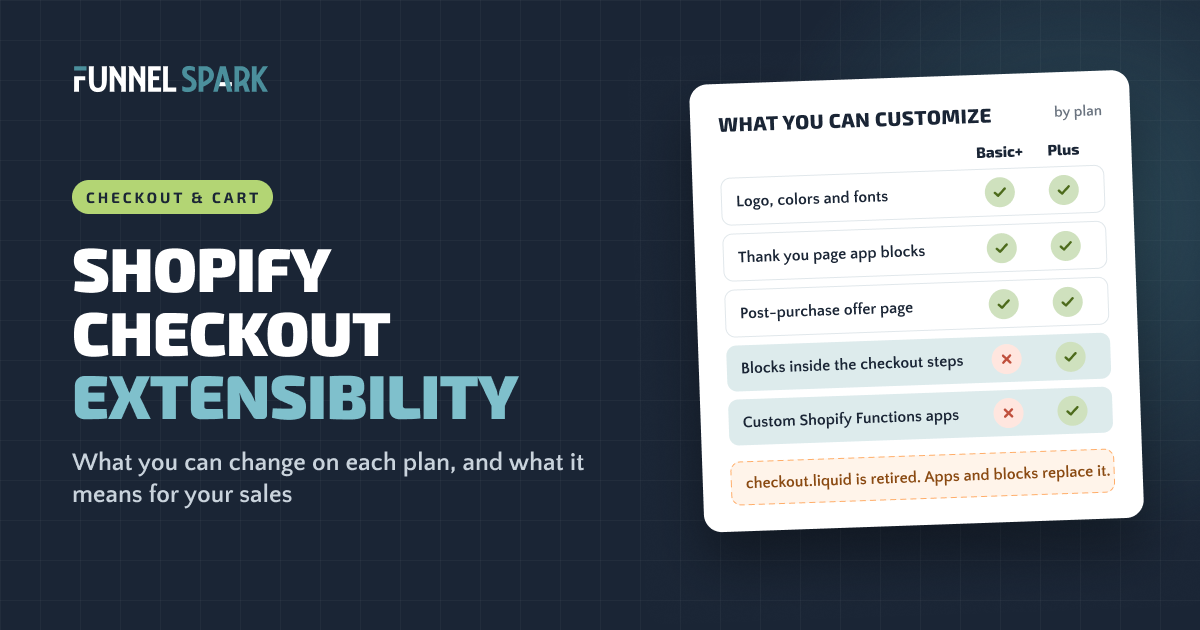
No. Every plan from Basic up uses it. But Plus gets the most valuable part: blocks inside the checkout steps themselves. Here's the split, from Shopify's help center pages on checkout apps and checkout customization:
| What you want to change | Basic, Shopify, Advanced | Shopify Plus |
|---|---|---|
| Logo, colors and fonts in the checkout editor | Yes | Yes, plus an API for advanced branding |
| One-page or three-page layout | Yes | Yes |
| App blocks on the Thank you and Order status pages | Yes | Yes |
| A post-purchase page (survey or upsell after payment) | Yes, 1 app at a time | Yes, 1 app at a time |
| Pixels for tracking | Yes | Yes |
| Public apps built with Shopify Functions (discounts, payment and delivery rules) | Yes | Yes |
| Custom apps built with Shopify Functions | No | Yes |
| App blocks inside the information, shipping and payment pages | No | Yes |
Where you can add things in Shopify's checkout
Your theme, so you can change almost anything.
Most freedomAll plans: branding, layout, payment methods.
Plus: app blocks like offers and trust lines.
A one-click offer or a survey, from 1 app.
App blocks, like a "How did you hear about us?" survey.
For context, Shopify's pricing page lists Plus from $2,300 a month. Most stores won't upgrade just for checkout blocks, which is why the non-Plus section below matters.
Does checkout extensibility change your conversion rate?
The new checkout itself is a solid base. On its checkout page, Shopify says its conversion rate beats competing platforms by an average of 15%, based on a study it ran with a big global consulting firm, and that Shop Pay gets 50% higher conversion compared to standard checkout. Those are Shopify's own claims, but the point stands: you're building on a well-tested checkout.
The upgrade changes your conversion rate through what came with it, and what got left behind.
Where the upgrade can cost you sales
- Lost reassurance. If your old checkout code showed a returns promise, a delivery estimate or a support line, an automatic upgrade may have removed it. In Baymard Institute's research, 19% of shoppers who abandoned an order didn't trust the site with their card details, and 13% didn't like the returns policy.
- Lost offers. An order bump or gift added by old code or Scripts stops working unless an app or Function replaced it. That hits order value, not just orders.
- Broken tracking. If your purchase tracking lived in additional scripts, your analytics and ad platforms may now see fewer orders than Shopify does. Your conversion rate can look like it fell when it didn't, and ad platforms that optimize on purchases get worse data.
- Clutter. It's easy to stack app blocks now. Shopify allows up to 3 apps in each area, and every one adds reading between the shopper and the pay button. Baymard found 17% of abandoners left because checkout felt too long or complicated.
When a store's conversion rate drops right after a checkout change, we check the tracking before we touch the checkout. Often the orders are still coming in. The pixel just stopped counting them.
Where it can help
Your checkout keeps getting Shopify's updates without anyone rewriting code. Apps you add work the same way across guest checkout and Shop Pay. And on Plus, you can now put a trust line or an offer exactly where shoppers decide, with an app instead of a developer. The wins come from choosing those blocks well.
Checkout blocks worth testing on Shopify Plus
This is exactly what checkout extensibility was built for, and you don't need a developer. Apps add these as blocks you place in the checkout editor. Shopify's own Checkout Blocks app covers banners, text, custom fields and simple offers, and paid apps like Checkout Wiz add upsells, free gifts and trust badges. Whichever app you pick, its blocks only show inside the contact, shipping and payment steps on Plus. Start with these 3, one at a time:
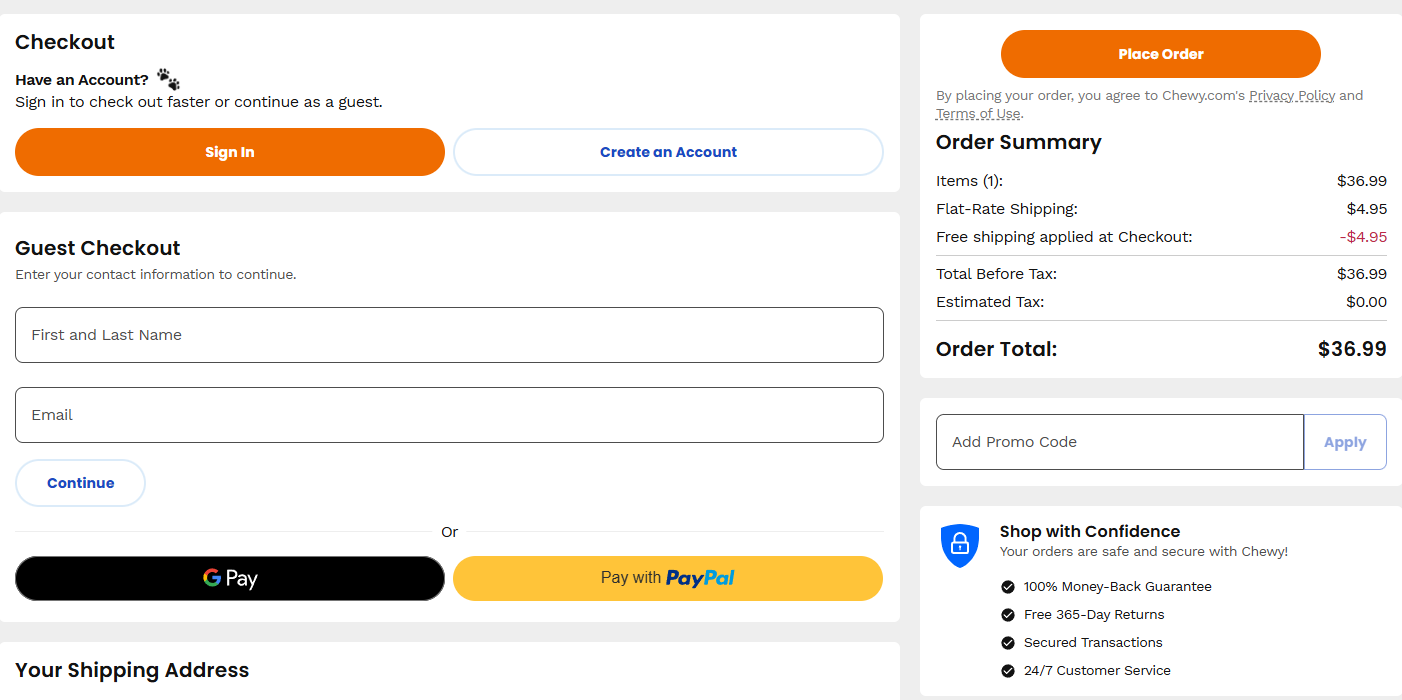
- A trust line near the pay button. Security, returns and support in one or two short lines. Of the 25 top stores we broke down page by page, 18 mention a secure checkout on the checkout page itself.
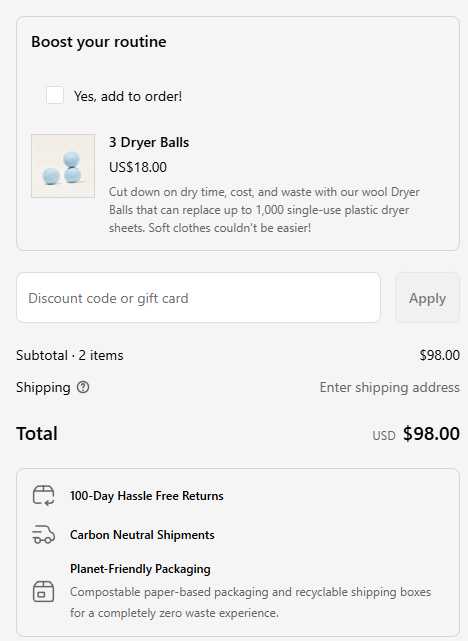
- A small pre-purchase offer. One cheap, related add-on with a one-click "add" button. Checkout Blocks and upsell apps like Checkout Wiz both offer this kind of block.
- A delivery message or banner. When it arrives, or that shipping is free. Baymard found 20% of abandoners left because delivery was too slow.
How to A/B test a checkout block
Don't add a block and hope. Split-test it, because a block that raises order value can still cost you completed checkouts. These tools can show a block to half your shoppers and hide it from the other half:
- Intelligems works with Shopify's Checkout Blocks app. The test sets a hidden cart attribute, and the block only shows for shoppers in the test group. Intelligems' docs say any Checkout Blocks block can be tested this way, including upsells and custom fields.
- ABConvert has a checkout UI test that adds its own blocks, like banners, trust badges, payment icons and support buttons, and splits traffic between versions.
- Checkout Wiz has A/B testing built in for each of its blocks.
All 3 need Plus for blocks inside the checkout steps. Judge each test by revenue per visitor, not only by conversion rate.
top online stores we broke down run an order bump right in their checkout. On Shopify, that takes Plus and a checkout extension, or an app built on one. Source: FunnelSpark's page-by-page breakdown of 25 brand funnels.
For more on picking the right add-on, see upsell vs cross-sell and our guide to increasing average order value. If you're weighing trust badges for that spot, read whether trust badges work first.
Not on Plus? Where your checkout wins are
Checkout block apps install on any plan, but on Basic, Shopify and Advanced their blocks can't go inside the contact, shipping and payment steps. You can still use the same kind of apps on the thank-you page and the post-purchase page. And most checkout problems start before the checkout anyway, so you have plenty of room:
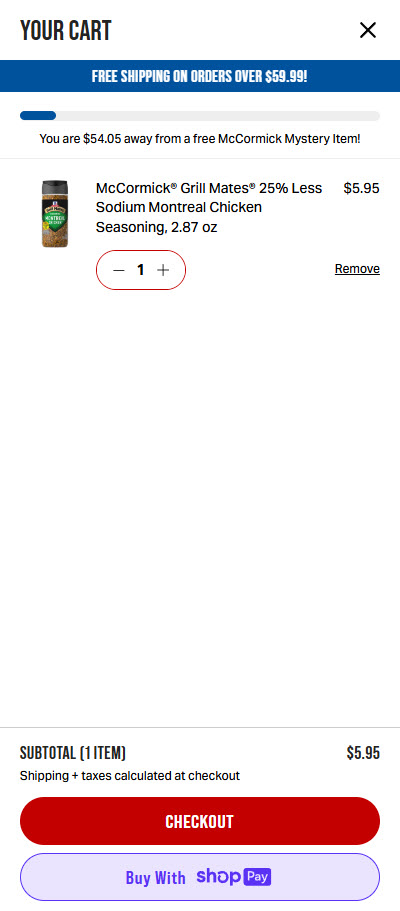
- The cart. It's part of your theme, so put your security and returns line right above the checkout button, and show shipping costs before shoppers click. In Baymard's research, extra costs like shipping are the top reason shoppers abandon, at 40%.
- Express pay. Turn on Shop Pay, Apple Pay, Google Pay and PayPal in your payment settings. 24 of the 25 top stores we broke down offer several ways to pay, and 6 show payment or express buttons right in the cart.
- The checkout editor. Make the checkout look like your store, with your logo, colors and fonts, so it doesn't feel like a strange new site.
- The post-purchase page. One app can show a one-click offer right after payment, when the shopper has already said yes.
- The thank-you page. Add app blocks, like a "How did you hear about us?" survey. Any app that offers blocks for the new Thank you page can put its content there.
- Rules through apps. Public apps built on Shopify Functions work on every plan. They can run tiered discounts and hide, rename or reorder payment and delivery options, with no Plus needed. Shopify's own Checkout Blocks app keeps those features for Plus, so on other plans you'd use a different app from the Shopify App Store.
The full list of fixes, plan by plan, is in our Shopify checkout optimization guide. If shoppers still leave, our guides to reducing cart abandonment and abandoned cart emails cover the rest.
Your post-upgrade checklist
Whether you upgraded yourself or Shopify did it automatically, run through this once:
- Compare orders. Put Shopify's order count for last week next to what Google Analytics and your ad platforms report. A big gap means a pixel needs fixing. Shopify recommends app pixels, or a custom pixel if no app fits.
- Place 2 test orders, one on a phone and one on a computer. Look for anything missing: trust lines, offers, delivery notes, a gift that used to appear.
- Rebuild what mattered with app blocks or Functions. Skip what nobody will miss.
- Work out your checkout completion rate: completed checkouts divided by sessions that reached checkout. Compare a few weeks before and after the upgrade, with matching tracking.
- Test new blocks one at a time, and judge them by revenue per visitor, not only orders. An offer that adds order value but costs completed checkouts can still lose money.
That last step matters more than it sounds. Of the 1,000+ A/B tests run by FunnelSpark, an ecommerce CRO agency for Shopify stores, 37% beat the original. Most changes that sound smart don't lift sales on their own. Our guide to ecommerce A/B testing shows how to run one, and here's why we use revenue per visitor to call winners.
FAQ
It's the set of tools Shopify uses for checkout customization now that checkout.liquid is retired: the checkout editor for branding and layout, checkout UI extensions for app blocks, Shopify Functions for discount, payment and delivery rules, and pixels for tracking.
No. Every plan from Basic up can use the checkout editor, pixels, post-purchase apps, public apps built with Functions, and app blocks on the Thank you and Order status pages. Only Plus can add app blocks inside the information, shipping and payment pages, or use custom apps built with Functions.
No. Shopify removed it from the information, shipping and payment pages on August 13, 2024, and from the Thank you and Order status pages on August 28, 2025, along with additional scripts. Non-Plus stores had until August 26, 2026 to upgrade those pages, and were upgraded automatically after that.
Not inside the contact, shipping and payment steps. That needs Shopify Plus and a checkout UI extension. On other plans, put your security and returns line in the cart, right above the checkout button, and use the checkout editor to brand the checkout.
Not by itself. The risk is losing customizations your old code handled, like reassurance or offers, and broken purchase tracking that makes your conversion rate look lower than it is. Compare orders across your tools, place test orders, and rebuild what mattered.
Written by
Nicolas Fradet
Nicolas is the founder of FunnelSpark, an ecommerce CRO agency. He has spent 16 years finding out why shoppers don't buy, with 1,000+ A/B tests run and a 37% win rate. He wrote Stop Guessing. Start Converting.
Follow Nicolas on LinkedIn →Want us to find what's stopping your shoppers?
On a free 30-minute call, Nicolas looks at your store and shows you 3 growth opportunities, whether we work together or not.
Book your free call