Revenue per visitor: the metric that beats conversion rate
What revenue per visitor is, how to find it in Shopify and GA4, and why it's the one number we judge every A/B test by.

By Nicolas Fradet, founder of FunnelSpark · 16 years in CRO, 1,000+ A/B tests
Updated Oct 28, 2026 · 8 min read
The short answer
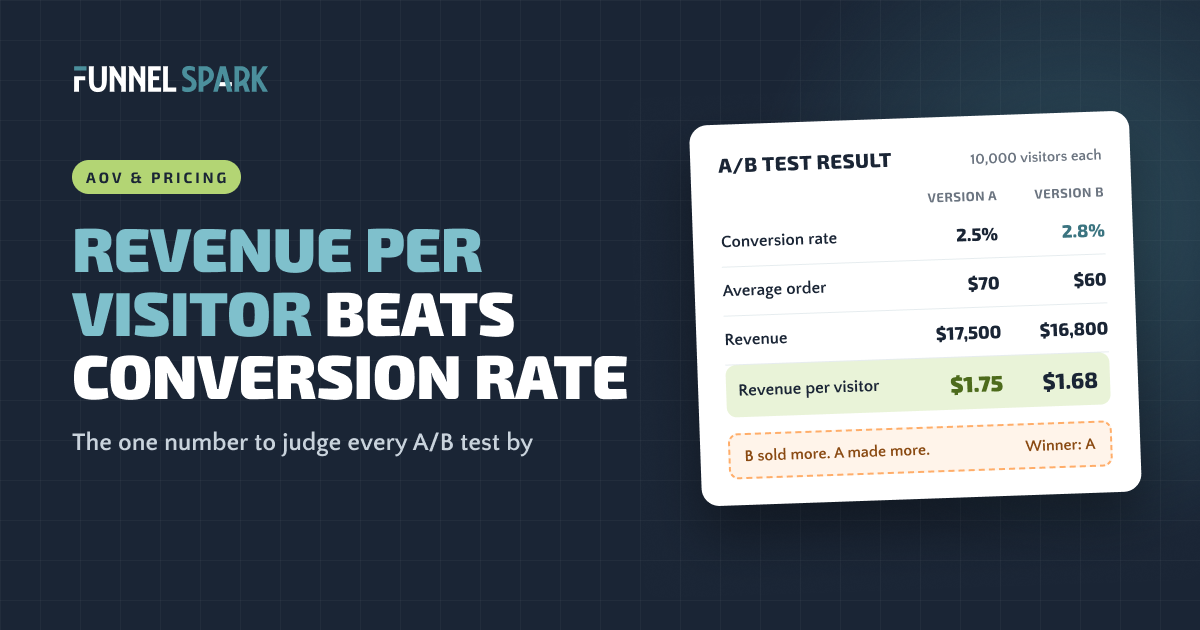
Revenue per visitor (RPV) is your total revenue divided by your number of visitors. It's the same as conversion rate × average order value, so it catches what each of those misses on its own. A change that gets more orders but smaller ones can lower your RPV, and that's money lost. That's why it's the best single number to judge A/B tests and store changes by.
What is revenue per visitor?
Revenue per visitor tells you how much money each person who lands on your store brings in, on average. Buyers and browsers both count. Most visitors buy nothing, so RPV is usually a small number, often a few dollars or less.
The formula is simple:
The revenue per visitor formula
Or, the short way: total revenue ÷ visitors. Both give you the same answer.
Example (a made-up store, to show the math)
| Last 30 days | |
|---|---|
| Visitors | 20,000 |
| Orders (2.5% conversion rate) | 500 |
| Average order value | $70 |
| Revenue | $35,000 |
| Revenue per visitor ($35,000 ÷ 20,000) | $1.75 |
Every visitor is worth $1.75 to this store. If it can make that $1.85, that's an extra $2,000 a month, or $24,000 a year, from the same traffic.
That last line is why RPV is so useful. It turns every idea into money. A 10-cent lift sounds tiny until you multiply it by all your visitors.
Why RPV beats conversion rate
Conversion rate counts orders. It doesn't care how big they are. Average order value (AOV) counts order size. It doesn't care how many orders you get. Each one, on its own, can lie to you.
Say the made-up store runs an A/B test on 10,000 visitors per version. Version B adds a 15% discount pop-up. Version C adds a bundle offer on the product page.
Same test, 3 versions, 10,000 visitors each
Conversion rate up 12%. Revenue per visitor down 4%.
Conversion rate down 4%. Revenue per visitor up 7%.
If you only looked at conversion rate, you'd roll out B. It got 30 more orders. But those orders were smaller, and B brought in $700 less per 10,000 visitors. You'd be paying for a "win" every single day.
And you'd throw away C, the version that actually made more money: $1,220 more per 10,000 visitors, even with fewer orders.
This is why we judge every A/B test by revenue per visitor. We've run 1,000+ tests, and 37% of them won, against an industry average of about 15%. Part of that is picking better ideas. Part of it is measuring the right thing, so a test that only looks good never gets called a winner.
"More orders and more money aren't the same thing," says Nicolas Fradet, founder of FunnelSpark. "Revenue per visitor is the number that tells you which one you got."
How to find RPV in Shopify and GA4
Neither tool puts "revenue per visitor" front and center, but both give you the two numbers you need. Pick a date range of at least 30 days so one big day doesn't skew it.
In Shopify
- Open Analytics in your Shopify admin and set the date range.
- Note your total sales and your sessions for that range.
- Divide total sales by sessions. That's your revenue per session, which is what most people mean by RPV.
Shopify counts sessions, not people, so one shopper who visits 3 times counts 3 times. That's fine. Just use the same measure every time you compare.
In GA4
GA4 has no built-in revenue per session metric. The closest ones are ARPU (average revenue per active user) and average purchase revenue, which is really your AOV. So do the math yourself:
- Go to Reports, then Acquisition, then Traffic acquisition.
- You'll see sessions and revenue for each channel, like organic search, paid social and email.
- Divide revenue by sessions for each row. Now you have RPV by channel, which is even more useful than one sitewide number.
If you check it often, build a free-form Exploration in GA4 with sessions and purchase revenue side by side, or paste both into a spreadsheet each month.
RPV vs AOV vs conversion rate
All 3 matter. They just answer different questions.
| Metric | Formula | What it tells you | What it misses |
|---|---|---|---|
| Conversion rate | Orders ÷ visitors | How many visitors buy | How much they spend |
| Average order value | Revenue ÷ orders | How much each buyer spends | How many visitors buy at all |
| Revenue per visitor | Revenue ÷ visitors (or conversion rate × AOV) | How much each visitor is worth | Profit: discounts and shipping costs can hide inside it |
Use RPV to decide if a change made money. Then look at conversion rate and AOV to understand why. Did more people buy, or did the same people spend more?
How to raise your revenue per visitor
Since RPV is conversion rate × AOV, you have 2 sets of levers. Pull both and the gains multiply. If the made-up store raises conversion rate by 10% (to 2.75%) and AOV by 10% (to $77), RPV goes from $1.75 to about $2.12. That's 21% more revenue from the same traffic, or about $88,000 a year.
Levers that raise conversion rate
- Show shipping costs early. Surprise costs at checkout are a top reason shoppers leave. Our cart abandonment guide covers this and the other big ones.
- Make checkout faster. Express pay buttons, guest checkout and fewer fields. See our Shopify checkout optimization guide.
- Answer doubts on the product page. Clear photos, sizing help, reviews, and returns info near the Add to Cart button.
- Fix the biggest leak first. If you have traffic but few sales, start with our guide to getting more sales on Shopify.
Levers that raise average order value
- A free shipping threshold. Set just above your AOV, it nudges shoppers to add one more item. Here's how to set your free shipping threshold.
- Bundles and "buy more, save more." Like Version C above: a better deal for buying more at once.
- Cart add-ons and gifts. Gift wrap, a small extra, or a free gift unlocked at a set order total.
- Order bumps at checkout. A one-click add-on offered right before payment.
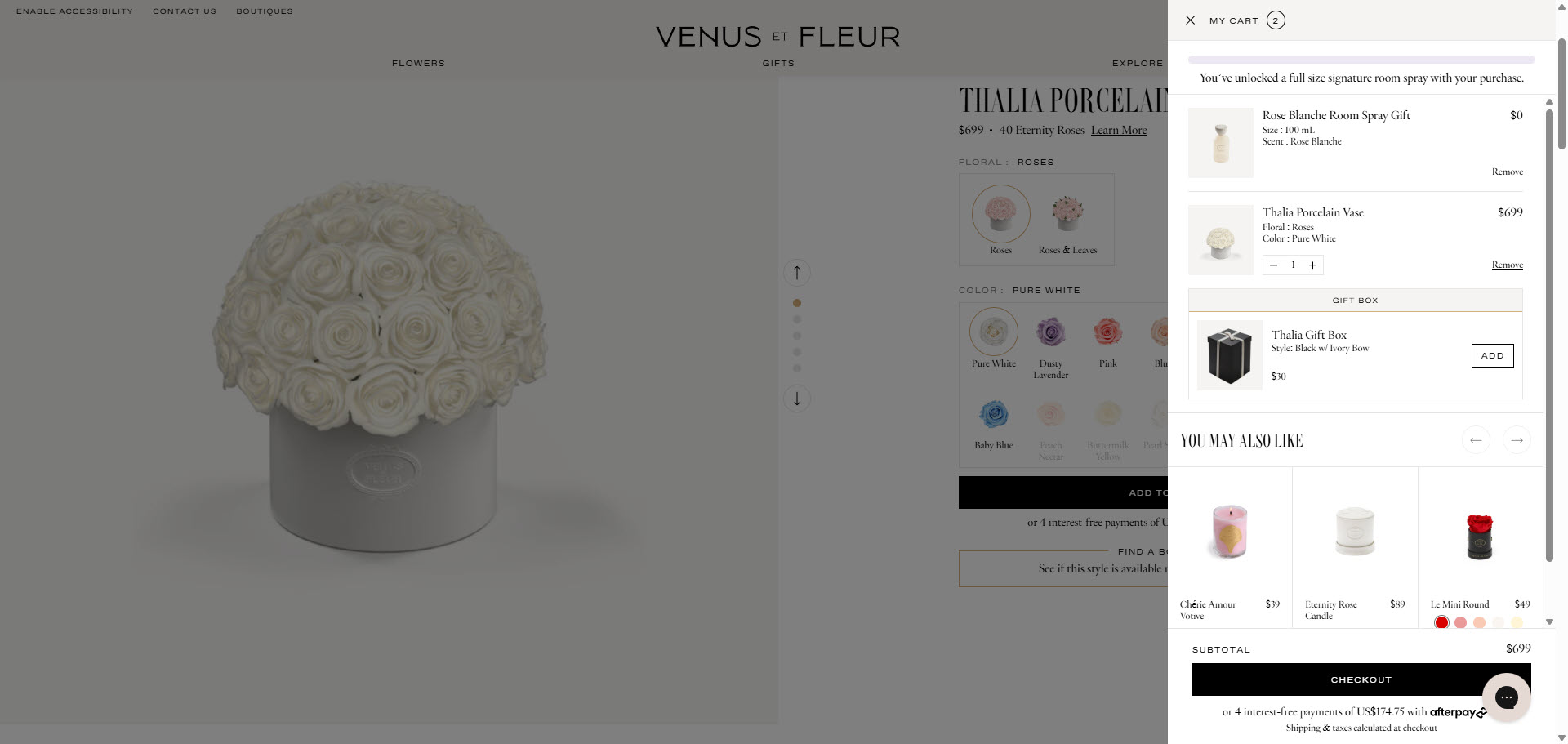
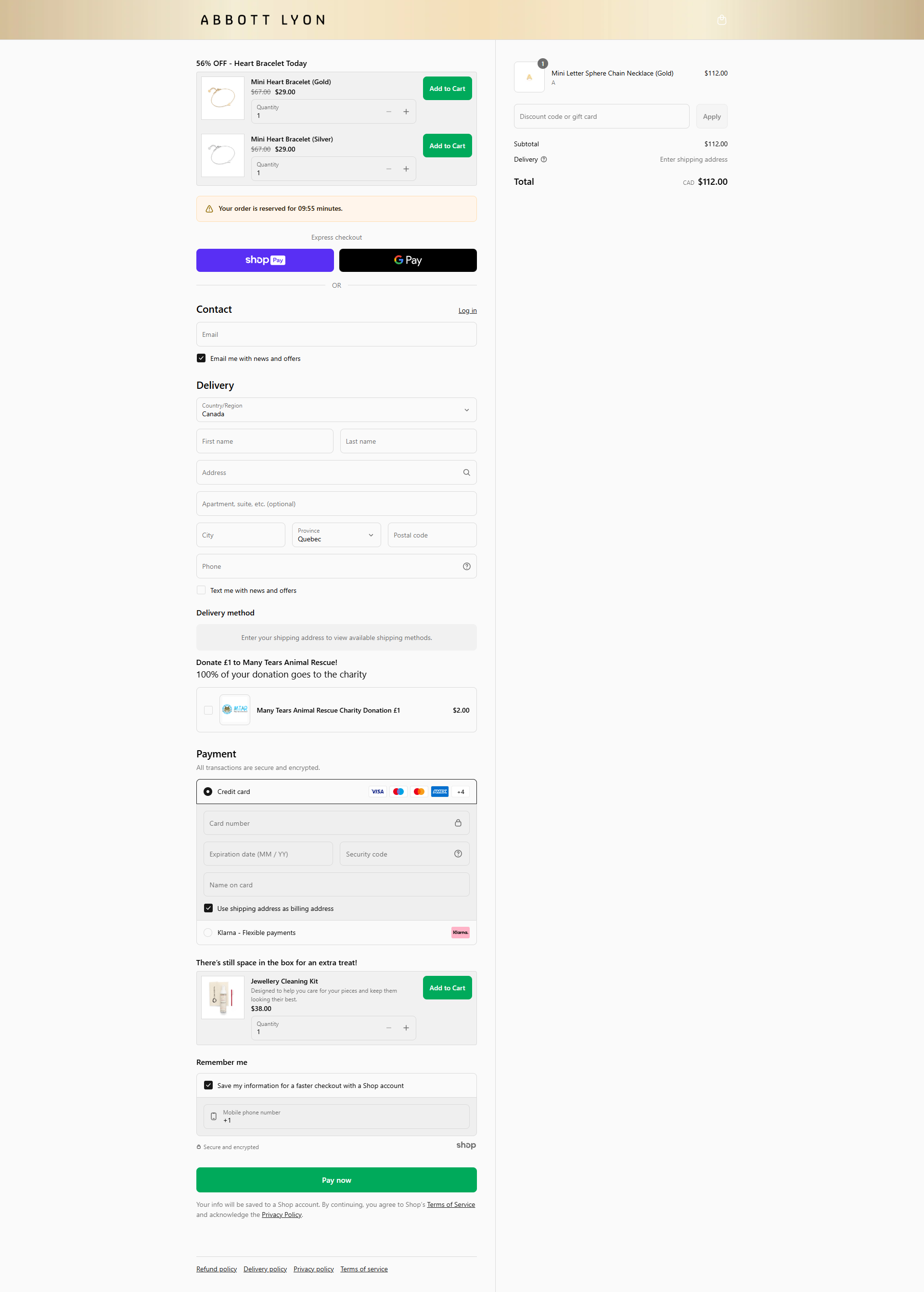
One warning: AOV levers can lower conversion rate, like Version C did. That's fine as long as RPV goes up. It's also why you should test them instead of just switching them on.
4 RPV mistakes to avoid
- Mixing traffic sources. Email subscribers might be worth $5 per visit and cold social traffic $0.80. If you run a big ad push, your sitewide RPV drops even though your store didn't change. Compare RPV by channel, and make sure both versions of a test get the same mix.
- Ending tests too early. RPV jumps around more than conversion rate, because one big order can swing it. Run tests for at least 2 full weeks, so you cover every day of the week, and wait for enough orders before you call it.
- Forgetting about profit. A 30% discount can raise RPV and still lose money. When a test changes prices, discounts or free shipping, check profit per visitor too: revenue minus product, shipping and discount costs, divided by visitors.
- Letting one huge order decide. A single wholesale-size order can make a losing version look like a winner. Look for outliers before you trust the result, and check that the win holds up without them.
Want to know where your store loses the most money right now? Our free Leak Finder scores your store on 20 checks, from homepage to checkout. For a deeper list, see our 40-point ecommerce CRO checklist.
FAQ
Divide your total revenue by your number of visitors for the same period. For example, $35,000 in revenue from 20,000 visitors is $1.75 per visitor. You can also multiply your conversion rate by your average order value: 2.5% × $70 = $1.75.
There's no single good number, because it depends on your prices and your traffic. A store selling $400 jackets will have a much higher RPV than one selling $15 phone cases. Compare your RPV to your own past numbers, by channel and by device, and aim to raise it over time.
For judging if a change made money, yes. Conversion rate ignores order size, so a change can raise it while lowering revenue. Use RPV to pick winners, then look at conversion rate and AOV to understand what changed.
AOV is revenue divided by orders, so it only looks at people who bought. RPV is revenue divided by all visitors, including the ones who didn't buy. RPV covers both how many people buy and how much they spend.
Not as one number on the main dashboard. Take total sales and sessions from Shopify Analytics for the same date range and divide one by the other. That gives you revenue per session, which is how most stores track RPV.
Written by
Nicolas Fradet
Nicolas is the founder of FunnelSpark, an ecommerce CRO agency. He has spent 16 years finding out why shoppers don't buy, with 1,000+ A/B tests run and a 37% win rate. He wrote Stop Guessing. Start Converting.
Follow Nicolas on LinkedIn →Want us to find what's stopping your shoppers?
On a free 30-minute call, Nicolas looks at your store and shows you 3 growth opportunities, whether we work together or not.
Book your free call