Upsell vs cross-sell: what's the difference (with examples from top stores)
What each one is, where top stores show them, real examples, and how to set both up on Shopify without annoying your shoppers.

By Nicolas Fradet, founder of FunnelSpark · 16 years in CRO, 1,000+ A/B tests
Updated Nov 3, 2026 · 8 min read
The short answer
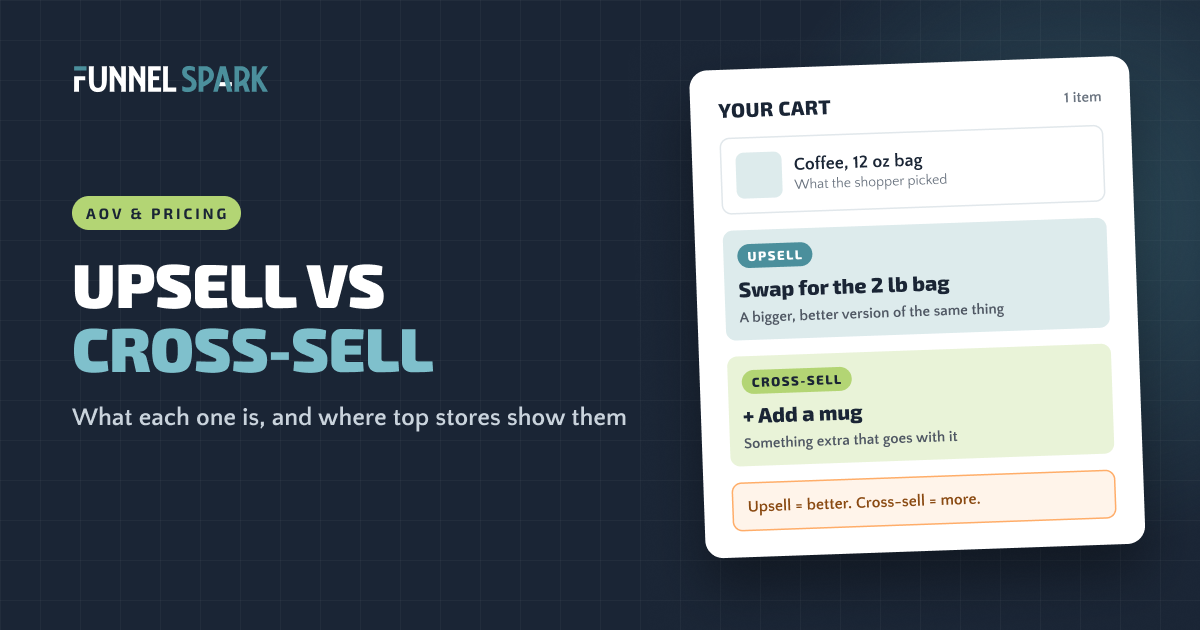
An upsell asks a shopper to buy a better or bigger version of what they're buying, like the 2 lb bag of coffee instead of the 12 oz. A cross-sell adds something that goes with it, like a mug. Both raise average order value. Of the 25 top stores we broke down, 22 use one or both before checkout.
What is upselling?
Upselling means offering a shopper a better or bigger version of the product they already picked.
Say someone adds a 12 oz bag of coffee. An upsell would be the 2 lb bag: it costs more but works out cheaper per cup. Online, upsells usually look like this:
- A bigger size or pack: the family size, the 3-pack, the 90-day supply.
- A premium version: the pro model, the leather version.
- A bundle: the full kit, priced below the parts.
- A subscription: "subscribe and save" instead of a one-time order.
- A bigger order: "spend $20 more for free shipping" upgrades the whole order.
What is cross-selling?
Cross-selling means offering something different that goes with what the shopper is buying: a mug with the coffee, a screen protector with the phone case.
You see them as "Frequently bought together", "Complete the look" or "You may also like". Shopify makes the same split: its help center calls similar products "related" (possible swaps) and products "often bought in addition to" one "complementary" (add-ons). Complementary is the cross-sell.
Upsell vs cross-sell: the difference at a glance
The simplest way to remember it: an upsell makes the order better, a cross-sell makes it bigger. Here's how they compare side by side.
| Upsell | Cross-sell | |
|---|---|---|
| What you offer | A better or bigger version of the same thing | A different product that goes with it |
| Coffee example | The 2 lb bag instead of the 12 oz | A mug or a grinder |
| What it changes | The price of the item (or the whole order) | The number of items |
| Where it works best | Product page, before they choose | Product page, cart drawer and checkout |
| Common mistake | Pushing an upgrade that's way above their budget | Showing random products that don't go with the cart |
Both raise your average order value (AOV): revenue divided by orders. They're 1 of the 7 moves in our guide on how to increase average order value.
Where top stores show them
We broke down the funnels of 25 top online stores page by page, from homepage to checkout, including SKIMS, Gymshark, Fenty Beauty and Crocs.
top stores we broke down show an upsell or cross-sell before checkout. 19 of them do it right in the cart. Only 7 add an order bump inside the checkout itself. Source: FunnelSpark breakdown of 25 top store funnels.
The cart is the favorite spot. The shopper has already decided to buy, so a small "add this too" feels like help, not a pitch.
Where upsells and cross-sells fit in the funnel
- Step 1Product pageUpsell
Bigger size, bundle or premium version, while they're still choosing.
Cross-sell"Frequently bought together" under the buy button.
- Step 2CartCross-sell
Small add-ons that go with what's in the cart.
Upsell"You're $X away from free shipping" or a gift.
- Step 3CheckoutCross-sell
1 cheap, related order bump with a single tick or button.
On Shopify, offers inside checkout need Plus.
- Step 4After paymentCross-sell
A one-click offer after the order is placed, before the thank-you page.
Cross-selling examples from top stores
Quad Lock: the add-on that pops up right after "Add to cart"
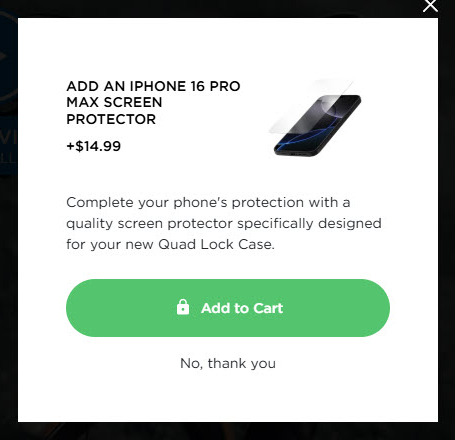
When you add a Quad Lock phone case, a pop-up offers the matching screen protector for your exact phone. It's cheap next to the kit, clearly goes with it, and takes 1 tap. Saying no is just as easy.
Venus et Fleur: a cart that sells 3 ways at once
Venus et Fleur, which sells long-lasting roses, stacks 3 offers in its cart drawer without feeling crowded.
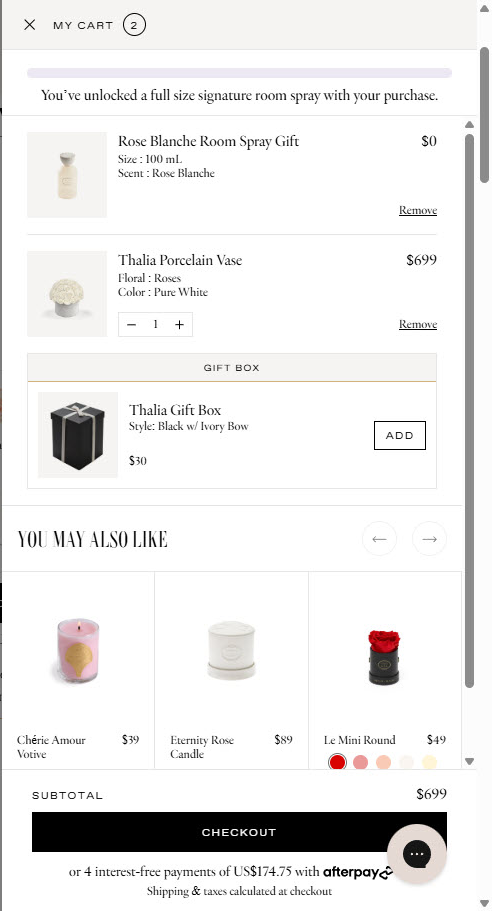
The gift box is a smart cross-sell for a gifting brand: people buying a present want it wrapped, so the offer answers a question they already had.
Black Rifle Coffee: "Frequently bought together", done well
On the product page, right under the buy area, Black Rifle Coffee shows a "Frequently bought together" box: the coffee you're looking at, a box of coffee rounds and a matching T-shirt. All 3 are ticked already, with one total price and an "Add selected to cart" button.
Gymshark and Fenty Beauty: suggestions inside the bag
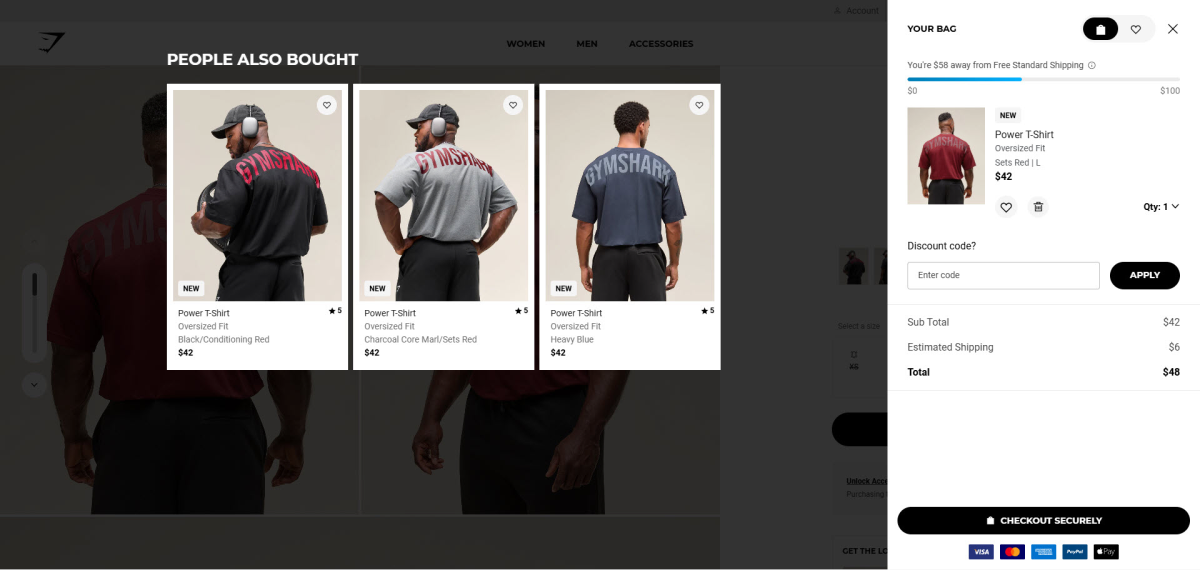
With a T-shirt in the bag, Gymshark shows a "People also bought" row with the same shirt in other colors, right next to a free shipping progress bar. Fenty Beauty's bag adds a "Handpicked for you" product with a crossed-out price.
Upselling examples from top stores
Product upsells are rarer online than cross-sells, because the product page already shows the options. Here's what top stores do:
- SKIMS: the pricier version, in the cart. With a slip dress in the bag, the "Others also bought" row shows a lace version and a long version of the same dress, each at a higher price.
- Venus et Fleur: a gift for a bigger order. Its homepage promotes a bonus gift for higher orders, and the cart confirms it once it's unlocked.
- Black Rifle Coffee, Gymshark and Bodybuilding.com: the free shipping nudge. Their carts show how far you are from free shipping. Black Rifle's says "Only $50.01 from free shipping!" Before you add one, read how to set your free shipping threshold, because the wrong number can cost you margin.
- Bodybuilding.com: subscribe and save. It offers a subscription option, which turns one order into many.
For your store, the classic upsell lives on the product page: show the bigger pack or bundle right next to the single item, with the savings spelled out per cup, per wear or per day. Shoppers compare while they're choosing, not once the item is in the cart.
Most stores treat upsells like shelf space to fill. The offers that sell answer one question: what does this shopper need next to enjoy what they just bought?
How to upsell and cross-sell on Shopify
You don't need 5 apps. Here's the order we'd set things up in:
- Pick your pairs by hand. List what people actually buy together in your orders. For each best seller, choose 1 to 3 add-ons that clearly go with it.
- Set them in Shopify's Search & Discovery app. Under Product recommendations, you can add up to 10 complementary products and 10 related products per product, according to Shopify's help center. Your theme needs a complementary products block on the product page for them to show.
- Add a cart cross-sell. Show 1 or 2 add-ons in the cart drawer (many themes and apps can). Keep them cheaper than the main item and addable in 1 tap.
- Add the upsell to the product page. Show the bigger pack, bundle or subscription as a clear option near the price, with the savings in plain numbers.
- Consider the checkout and after payment. Shopify's checkout is one page by default and locked down. Adding an order bump or any custom text inside the checkout steps needs Shopify Plus: Shopify's developer docs say the checkout extensions these offers use are Plus-only. After payment, apps can show a one-click offer on a page before the thank-you page, though Shopify skips it for some payment methods, like wallets. See our Shopify checkout guide for what you can change.
- Test it. An offer can raise AOV and still cost you orders if it distracts people. A/B test it and judge it by revenue per visitor, which counts both. Our A/B testing guide shows how.
Quick math: what a cross-sell can add (made-up example)
| Your store | Before | With a $14 mug offer |
|---|---|---|
| Orders per month | 1,000 | 1,000 |
| Shoppers who add the mug | 0 | 100 (1 in 10) |
| Average order value | $40.00 | $41.40 |
| Extra revenue per month | $0 | $1,400 |
Only true if the offer doesn't cost you orders, so test it.
5 mistakes that make shoppers ignore your offers
- Random suggestions. Baymard Institute found that 52% of the desktop sites it benchmarked show cart cross-sells that are either irrelevant or based only on what other customers bought. Its testing also found one odd suggestion can make shoppers distrust all the others. Hand-pick your top pairs.
- Too many offers. A cart with 12 suggestions looks like a catalog. Pick 1 to 3.
- Upgrades that jump the budget. A $300 version for someone buying the $60 one rarely works. Stay close to what they chose.
- Blocking the checkout. Pop-ups that are hard to close, or offers that push the checkout button out of sight, can cost you the whole order. Make "no thanks" easy, the way Quad Lock does.
- Judging by AOV alone. A higher order value with fewer orders can mean less money. Check revenue per visitor and your conversion rate together.
FunnelSpark, an ecommerce CRO agency for Shopify stores, has run more than 1,000 A/B tests for online stores. Want to see where your store leaks money first? Try our free Leak Finder, or plug your numbers into the revenue calculator.
FAQ
Upselling offers a better or bigger version of the product the shopper picked, like a larger size or a bundle. Cross-selling offers a different product that goes with it, like a mug with coffee.
Offering the 2 lb bag of coffee to someone who picked the 12 oz bag is an upsell. Online, common upsells are bigger packs, bundles, premium versions, subscriptions and "spend $X more for free shipping" messages.
It's a cross-sell box showing products often bought with the one you're viewing, usually with a combined price and one button to add them all.
Neither wins everywhere. Upsells work best on the product page, while the shopper is still choosing. Cross-sells work best in the cart, once they've decided. Of the 25 top stores we broke down, 19 show an upsell or cross-sell in the cart.
Show the bigger pack, bundle or subscription on the product page. For cross-sells, set complementary products in Shopify's Search & Discovery app or use a cart app. Offers inside the checkout steps need Shopify Plus.
Written by
Nicolas Fradet
Nicolas is the founder of FunnelSpark, an ecommerce CRO agency. He has spent 16 years finding out why shoppers don't buy, with 1,000+ A/B tests run and a 37% win rate. He wrote Stop Guessing. Start Converting.
Follow Nicolas on LinkedIn →Want us to find what's stopping your shoppers?
On a free 30-minute call, Nicolas looks at your store and shows you 3 growth opportunities, whether we work together or not.
Book your free call