FAQ page examples that answer objections (and sell more)
How to turn the questions in your support inbox into answers that sell, on your FAQ page and on the product page, with examples from the 25 top stores we broke down.

By Nicolas Fradet, founder of FunnelSpark · 16 years in CRO, 1,000+ A/B tests
Updated Oct 30, 2026 · 9 min read
The short answer
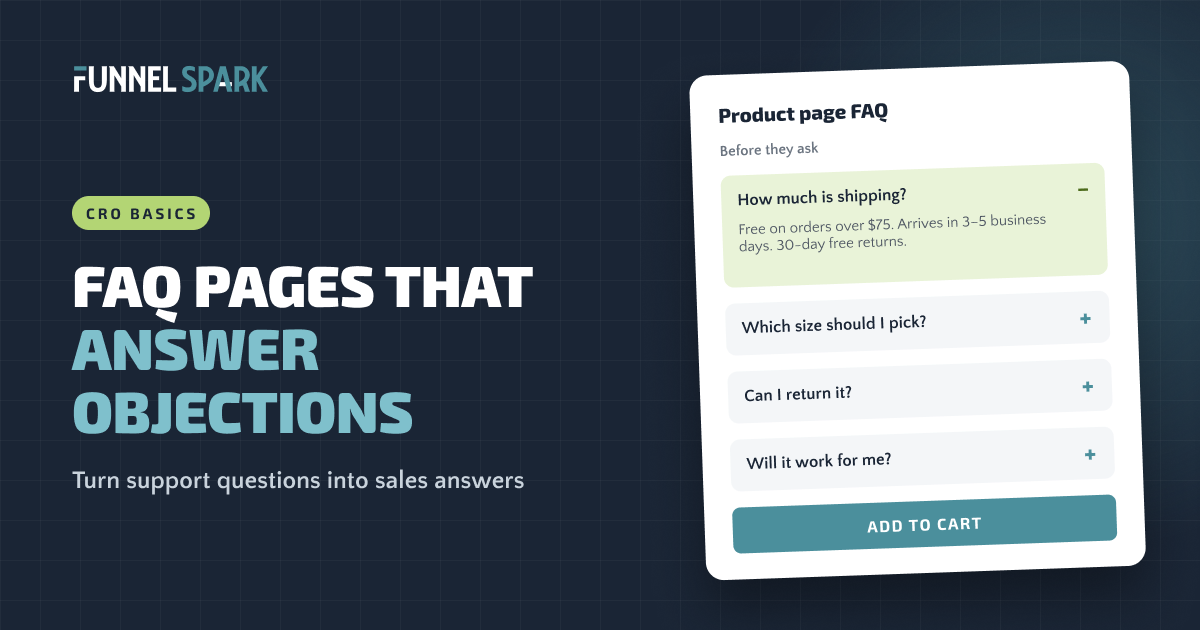
A good ecommerce FAQ answers the questions that stop people from buying: what shipping costs, when it arrives, what if it doesn't fit, can I send it back, will it work for me. Lead with the answer, group questions by worry, and repeat the top 3 to 5 on the product page, near the add to cart button.
Why most FAQ pages don't sell
Most FAQ pages are written for the support team. The goal is fewer emails, so the answers end up vague and a bit legal. That's a missed sale. Every question on that page is a reason someone almost didn't buy.
Look at why shoppers leave. Baymard Institute's checkout research lists the top reasons people abandon checkout: extra costs that are too high (40%), delivery that's too slow (20%), not trusting the site with their card (19%), and a returns policy they don't like (13%). Each one is a question your FAQ could have answered earlier. How much is shipping? When will it arrive? Are you legit? Can I send it back?
So at FunnelSpark, an ecommerce CRO agency for Shopify stores, we treat the FAQ as a sales page. Same questions, different job. The support version says "here's our policy." The sales version says "here's why it's safe to buy."
| Question | Support answer | Sales answer |
|---|---|---|
| Can I return it? | "Returns are accepted within 30 days, subject to our returns policy." | "Yes. Send it back within 30 days for a full refund. The return label is free." |
| How long does shipping take? | "Shipping times vary by location." | "Most US orders arrive in 3–5 business days. Order by 2 PM ET and it ships the same day." |
| Which size should I get? | "Please refer to our size chart." | "Most people take their usual size. Between 2 sizes? Size up. Wrong size? Exchanges are free." |
These are our own examples, not copy from a real store. Only promise what your store really does.
Which questions belong on your FAQ page?
Don't guess. Your customers have already told you what worries them. Pull the questions from 5 places:
- Your support inbox and chat. Sort the last 3 months of emails by topic. The 10 biggest topics start your FAQ.
- Your reviews. 3-star reviews are gold. "Love it, but it runs small" is a sizing question you didn't answer.
- A post-purchase survey. Ask new buyers one question: "What almost stopped you from buying today?"
- Your site search. Searches for "shipping," "returns" or "size" mean shoppers couldn't find the answer.
- Social comments and DMs. Pre-sale questions matter most.
Then sort each question by the worry behind it. Almost every question falls into one of 5 groups:
The 5 worries behind every FAQ
How much is shipping? Any duties or fees?
When will it arrive? Will it come before the holidays?
Can I send it back? Is there a guarantee?
Which size? Will it work for my skin, my car, my dog?
Are you a real company? Who do I call if something goes wrong?
FAQ examples from 25 top stores
We broke down 25 top online stores page by page, including Gymshark, Chewy, KEEN and Crocs. Their best answers weren't tucked away on an FAQ page. They sat on the product page, right where the shopper makes up their mind.
top stores we broke down use accordions or tabs on the product page, so shoppers can open the one answer they need without a wall of text. Source: FunnelSpark's page-by-page breakdown of 25 top online stores.
Decathlon: real questions, answered on the product page
Decathlon has a Questions & Answers section on its product pages. Shoppers ask, Decathlon staff answer, and each answer stays on the page for the next shopper with the same doubt. Will this backpack work as a carry-on? Does it come in another color? The next person doesn't have to email anyone.
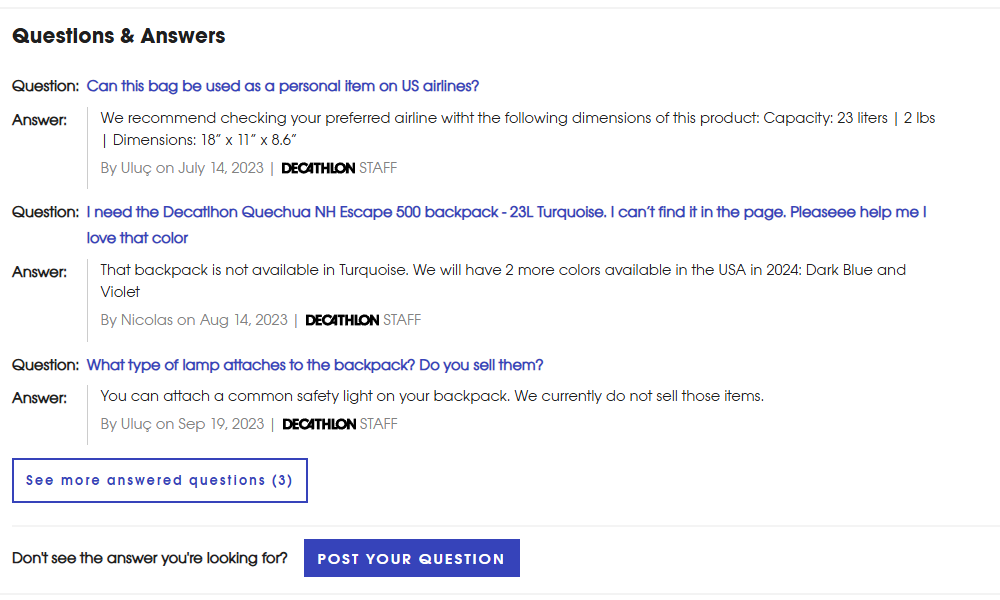
You don't need a Q&A app to copy this. Take the 3 questions your support team gets most about a product and add them as an accordion on that product page.
KEEN: the answers sit around the button
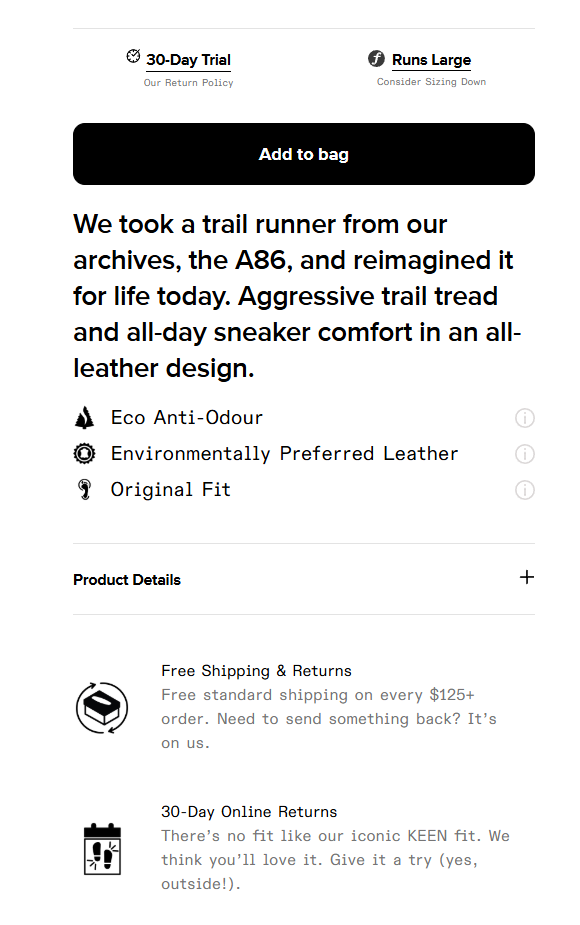
KEEN puts the fit, shipping and returns answers right above and below the Add to bag button. Our notes call delivery and returns details "always a strong visitor concern," which is exactly why they belong there.
Cambridge Satchel goes one step further: its delivery section is open by default, so shoppers see it without a tap. If one answer matters to almost everyone, don't make them click for it.
Oh Polly and Kylie Cosmetics: one big worry, answered
For clothes, the big worry is fit. Oh Polly says what size the model wears, and its reviews carry sub-ratings like "overall fit." For beauty, it's what's inside. Kylie Cosmetics keeps the ingredients one tap away for shoppers who want them, without taking space for everyone else.
Here's how often the 25 stores answer the big worries before checkout:
What the 25 top stores answer before checkout
| Answer | Stores |
|---|---|
| Accordions or tabs on the product page | 16 of 25 |
| A guarantee or returns promise | 12 of 25 |
| Shipping or delivery details before checkout | 9 of 25 |
| A size guide or the model's size | 8 of 25 |
| A support contact (Chewy's phone line at checkout, Blackstone's support on the product page) | 2 of 25 |
Counts are what our notes call out, so read each one as "at least."
How to write an FAQ answer that sells
Good answers follow the same 4 steps. Use this template for every question on the page:
- Answer first. Yes, no or a number, in the first few words. "Yes." "Free over $75." "3–5 business days."
- Remove the risk. What happens if it goes wrong, and who pays? "If it doesn't fit, exchanges are free."
- Back it up. A guarantee, a number, a line from a review, a photo of the packaging.
- Point to the next step. A link to the full policy, the size guide or the product.
Here's one answer, before and after:
Before
How much is shipping?
Shipping costs are calculated at checkout based on your location and the weight of your order.
After
How much is shipping?
Free on orders over $75. Under $75, it's a flat $6. Most orders arrive in 3–5 business days, and you get 30-day free returns. See rates for every country.
Our example, not a real store's copy.
The "before" makes the shopper do the work, so they assume the worst: expensive shipping. The "after" answers the question, then the next 2 they were about to ask.
Write like you talk. No "subject to" or "at our discretion." If a rule has a catch, say it plainly: hiding it only moves the question to your inbox, or to a 1-star review. If you don't ship to Alaska, say so before checkout does.
If shipping cost is your most-asked question, the fix may be the offer, not the answer. Here's how to set a free shipping threshold.
FAQ page or product page: where should answers go?
Both, but not the same answers. Each spot has its own job:
| Where | What goes there | Example |
|---|---|---|
| Under the add to cart button | 1 line on shipping, delivery and returns | "Free shipping over $75 · Arrives in 3–5 days · 30-day returns" |
| Product page accordion | 3 to 5 questions about this product | Sizing, materials, care, what's in the box, compatibility |
| Cart | Shipping cost and returns, said again | "You've unlocked free shipping" plus a returns line |
| FAQ page | Every question, grouped by topic, with links to full policies | Orders, shipping, returns, products, payment |
| Footer | Separate Shipping and Returns links, plus the FAQ | "Shipping" · "Returns" · "FAQ" · "Contact" |
That footer row matters more than it looks. Baymard Institute found that 57% of ecommerce sites have returns and shipping info on or linked from the product page, yet some shoppers still head straight to the footer for it. Baymard also warns against tucking the returns policy behind generic "FAQ" or "Help" links. Give Shipping and Returns their own footer links.
What about checkout? On Shopify, one-page checkout is the default, and adding your own text inside the checkout steps needs Shopify Plus. So for most stores, the cart is the last easy place to repeat your shipping and returns answers. Our Shopify checkout fixes cover what you can change there, and our product page optimization guide covers the rest of the page around your FAQ accordion.
FAQ page design: 7 rules
- Group by topic. Orders, Shipping, Returns, Products, Payment. Shoppers scan for their topic, not for question 23.
- Most-asked first inside each group.
- Write questions the way customers ask them. "Where's my order?" beats "Order tracking information."
- Use accordions, with every question visible. Shoppers should be able to scan all the questions without opening one.
- Add a search box once you pass about 20 questions.
- End with a way to reach a human: email, chat or phone, and your hours.
- Link to it from the footer, product pages and cart, and update it every month from your support inbox.
One thing not to do: write your FAQ for Google. Google Search Central's documentation updates say the FAQ rich result is no longer shown in Google Search results. Write for the shopper reading the page.
How to tell if your FAQ is working
Check 3 numbers before and after you rewrite your answers: support emails on those topics, the add to cart rate on the product pages where you added an accordion, and your conversion rate. Fewer emails and more add to carts mean your answers work.
If you have the traffic, A/B test it: the product page with the FAQ accordion vs without, judged on orders and revenue per visitor. With less traffic, mind the math: proving a 10% lift at a 2% conversion rate takes about 161,000 visitors, so lean on faster signals like add to cart rate and on what customers tell you. Our guide to ecommerce A/B testing shows how to set up the test, and what is CRO? explains the bigger picture.
Every question in your support inbox is a sale that almost didn't happen. Some shoppers email you. The rest just leave. Answer the question on the product page and you keep both.
Want to know which questions are costing you the most? Our free Leak Finder walks you through 20 checks from homepage to checkout, and our ecommerce CRO checklist goes deeper. If shoppers are reaching the cart and still leaving, start with how to reduce cart abandonment.
FAQ
Shipping costs and delivery times, returns and exchanges, sizing or fit, payment options, order tracking, and how to reach you. Add the product questions your support team gets most often. Group them by topic and start every answer with a clear yes, no or number.
Yes, the top 3 to 5 questions for that product. 16 of the 25 top stores we broke down use accordions or tabs on the product page, which lets you add answers without a wall of text. Keep a full FAQ page as well.
There's no magic number. Cover the questions your customers really ask, group them by topic and put the most-asked first. Once you pass about 20 questions, add a search box so shoppers can jump to theirs.
Answer first with a yes, no or number. Then remove the risk (what happens if it goes wrong), back it up with a guarantee or a number, and link to the next step, like the full policy or the size guide.
Google no longer shows FAQ rich results in its search results, according to Google Search Central's documentation updates. Write your FAQ for shoppers first. Clear answers help the people who land on your page, and that's where the sales come from.
Written by
Nicolas Fradet
Nicolas is the founder of FunnelSpark, an ecommerce CRO agency. He has spent 16 years finding out why shoppers don't buy, with 1,000+ A/B tests run and a 37% win rate. He wrote Stop Guessing. Start Converting.
Follow Nicolas on LinkedIn →Want us to find what's stopping your shoppers?
On a free 30-minute call, Nicolas looks at your store and shows you 3 growth opportunities, whether we work together or not.
Book your free call