How to build trust when nobody knows your brand
Big brands get trust for free. A new store has to earn it on the page. Here are the 3 questions every new shopper asks, the 8 trust signals that answer them, and where to put each one.

By Nicolas Fradet, founder of FunnelSpark · 16 years in CRO, 1,000+ A/B tests
Updated Nov 1, 2026 · 9 min read
The short answer
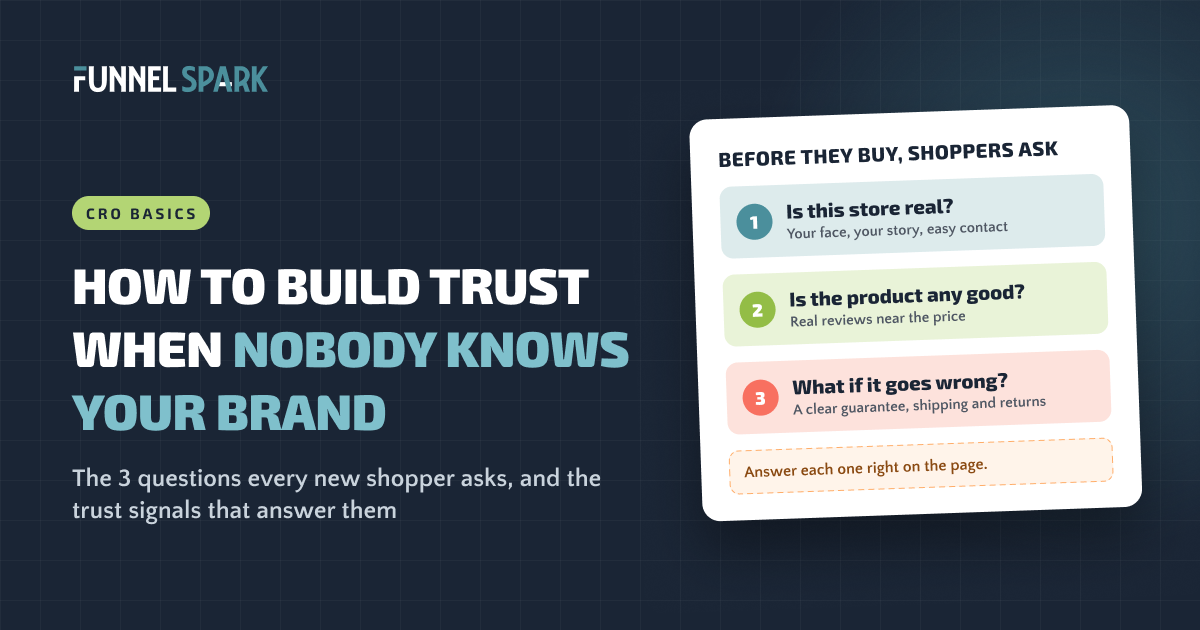
Answer the 3 questions every new shopper asks before they'll pay a store they've never heard of: Is this store real? Is the product any good? What happens if something goes wrong? Real reviews, a one-line guarantee, clear shipping and returns, real faces and easy contact options answer them. Put each answer where the worry shows up.
Why is trust harder when nobody knows your brand?
When someone shops at a brand they already know, they don't wonder if the order will show up. A new store doesn't get that free pass. The shopper has never heard of you, so every doubt needs an answer on the page.
Those doubts cost real sales. In Baymard Institute's checkout research, 19% of shoppers who abandoned a checkout said they didn't trust the site with their credit card information. Another 13% left because the returns policy wasn't good enough. Both are trust problems, and both hit at the very last step, after you've already paid to bring that shopper in.
A big brand gets the benefit of the doubt. A new brand doesn't. Shoppers won't email you to ask if you're legit. They'll just leave. So every question they might have needs an answer right there on the page.
What are trust signals?
Trust signals are anything on your store that tells a shopper "you're safe buying here." Trust badges are one kind, but only a small part. Most of the trust on a good store comes from plain things: reviews, a clear promise, real people and straight answers.
| Type | Examples | What it tells the shopper |
|---|---|---|
| Proof | Reviews, star ratings, customer photos, review counts | "Other people bought this and liked it." |
| Promises | Money-back guarantee, free returns, price guarantee | "If it goes wrong, I won't lose my money." |
| People | Founder photo and story, team, named support staff | "Real humans run this store." |
| Policies | Shipping, returns, privacy and contact pages | "There are rules, and I can read them." |
| Payment | PayPal, Shop Pay, card logos, a padlock, pay later | "My card is safe here." |
| Third parties | "As featured in" logos, certifications, awards | "Someone I trust has checked them out." |
We covered badges on their own in do trust badges work? This article is about everything else.
The 3 questions every new shopper asks
Before a new visitor buys, they quietly work through 3 questions. Each one has its own trust signals, and each tends to come up at a different spot in your store:
What a new shopper needs to know before they buy
- Founder photo and story
- Email, chat or phone that's easy to find
- Clear policies
- Press or stockist logos you've earned
Where: homepage, header, footer, about page
- Real reviews with star ratings
- Customer photos
- Reviews that answer the big worry (fit, taste, results)
- Certifications
Where: product page, near the name and price
- A one-line guarantee
- Shipping time and returns window
- Familiar ways to pay
- A padlock or "secure checkout"
Where: under the add to cart button, in the cart
The order matters too. Nobody reads your returns policy if the store looks fake. Get question 1 right first, then 2, then 3.
What top stores use to build trust
We broke down 25 top online stores page by page, including Chewy, Gymshark, SKIMS, Crocs and Fenty Beauty. These are brands almost everyone knows, and they still work on trust at every step:
Trust signals in the 25 top stores we broke down
| Trust signal | Stores |
|---|---|
| Several ways to pay | 24 of 25 |
| Ratings and reviews on the product page | 23 of 25 |
| A secure checkout mention | 19 of 25 |
| A guarantee or returns promise | 12 of 25 |
| Shipping or delivery details before checkout | 9 of 25 |
| Huge review counts shown off | 8 of 25 |
| Trust badges or logos | 8 of 25 |
| Celebrity endorsements | 6 of 25 |
| Support contact made a selling point | 2 of 25 |
Counts are what our notes call out, so read each one as "at least."
If brands this big still show reviews, guarantees and secure checkout, a store nobody knows needs them even more. The good news: the most common signals are also the cheapest to show.
8 ways to build trust with customers online
Here's what we'd put in place on a store nobody knows yet, starting with what moves the most shoppers.
1. Collect real reviews and show them near the price
top stores show ratings and reviews on the product page. Only payment options were more common in our breakdown. Badges, guarantees and celebrity faces were far behind. Source: the 25 top stores FunnelSpark broke down page by page.
The research backs it up. The Spiegel Research Center at Northwestern University found that a product with 5 reviews was 270% more likely to be bought than one with none, and that the benefit of more reviews drops off quickly after the first 5. So you don't need thousands. You need a few real ones on every product that sells.
The same research found that purchase likelihood usually peaked at ratings between 4.0 and 4.7 stars, not at a perfect 5.0. A few honest 3-star reviews make the 5-star ones believable. Verified buyers also tended to rate higher than anonymous reviewers, so mark reviews from real customers as verified.
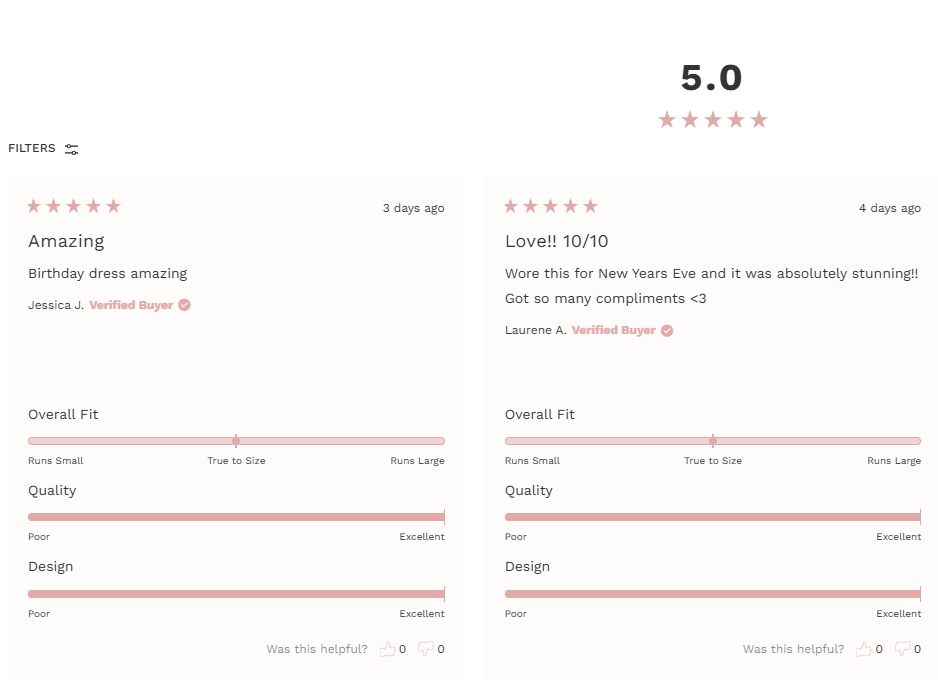
To get them, send a review request by email a few days after delivery, not right after the order, and ask for a photo. Then show the stars and the review count right under the product name. The best reviews answer the big worry for your product. Oh Polly asks every reviewer to rate the fit:
Never fake it. The US Federal Trade Commission announced a final rule that bans fake reviews (including AI-generated ones), paying for reviews that say something positive or negative, and claiming you show all reviews while hiding the bad ones. The FTC can seek civil penalties against businesses that break it knowingly.
2. Make a guarantee you can say in 1 line
12 of the 25 top stores we broke down show a guarantee or returns promise. Hawthorne shows a quality promise on its product pages, and Bodybuilding.com offers a price guarantee. Blueland puts its guarantee right under the add to cart button:
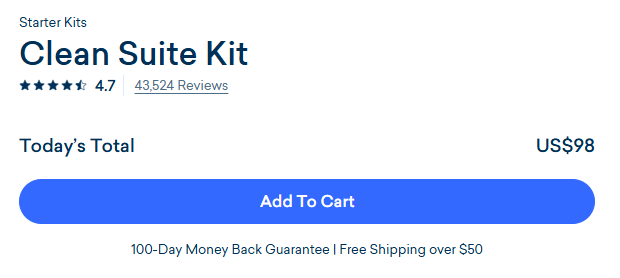
Make it concrete. "Satisfaction guaranteed" makes the shopper guess. "Try it for 60 days. If you don't love it, we'll refund you" tells them exactly what they get. Only promise what you can afford to honor. Our guide to ecommerce copywriting shows how to write lines like this.
3. Put shipping and returns next to the button
"When will it get here?" and "Can I send it back?" stop a lot of first orders. 9 of the 25 top stores show shipping or delivery details before checkout. KEEN shows delivery and returns details on the product page. Cambridge Satchel keeps its delivery details open by default, so shoppers don't even have to tap. Chewy shows a delivery date estimate.
A short line under the button does the job: "Free shipping over $75 · Ships in 1 business day · 30-day returns." Only promise what's true. Not sure where to set the number? Here's how to pick your free shipping threshold.
4. Show the real people behind the brand
The Stanford Web Credibility Project lists "show that honest and trustworthy people stand behind your site" among its 10 guidelines for a credible website. A big brand can skip this. You can't. Add a founder photo and a short story to your about page, a short video of you using the product, and real names on your emails.
Big brands borrow faces: 6 of the 25 we broke down use celebrity endorsements. You don't need to. Black Rifle Coffee puts its mission and veteran roots up front. Your own face, story and customers' photos can do the same job, because they're real.
5. Make it easy to reach you
Stanford's guidelines also say to make your phone number, physical address and email easy to find. A store with no way to reach a human looks like a store that might disappear with your money.
This is an easy place to stand out. Only 2 of the 25 top stores make support a selling point on the page: Chewy shows phone support at checkout, and Blackstone offers easy support on the product page. Put an email or chat link in your header or footer, say how fast you reply ("We answer within 1 business day"), and build an FAQ page that answers worries before anyone asks. These FAQ page examples show how.
6. Write clear policies in plain English
On Shopify, you add your return, shipping, privacy, terms of service and contact information policies under Settings > Policies. Shopify's help center says they're then linked in the footer of your checkout pages automatically.
Don't stop at the legal template. Write a plain returns page: how many days, who pays return shipping, how fast the refund comes. Link it from the product page and the cart.
7. Offer familiar ways to pay
24 of the 25 top stores offer several ways to pay. When a shopper sees PayPal, Shop Pay or Apple Pay, they're paying through a company they already trust, not a store they found 5 minutes ago. 10 of the 25 show payment options or card logos in the cart, and Quad Lock puts a small padlock right on its add to cart button:

One catch: on Shopify, adding your own text or badges inside the checkout steps, near the pay button, needs Shopify Plus. Shopify's checkout is one page by default and already shows its own security cues. On other plans, put your payment logos and a "secure checkout" line in the cart instead. Our Shopify checkout optimization guide covers what each plan allows.
8. Borrow trust from names your shoppers know
Cambridge Satchel shows "featured in" logos from the press, and Chewy shows certifications on its homepage. If a magazine wrote about you, a known shop stocks you or a lab tested your product, say so and link to the proof. Only show logos and seals you've really earned.
And fix the small stuff. Typos, broken links and an old year in the footer all whisper "nobody's home." Stanford's guidelines warn that errors like these hurt credibility more than most people expect.
Where to start (and how to know it's working)
Start where shoppers drop off. Plenty of add to carts but few orders? Your trust gap is probably in the cart and checkout (see reducing cart abandonment). Few add to carts at all? It's on the product page (see product page optimization).
Then check the change worked. Most new brands don't have the traffic for a clean A/B test on orders: proving a 10% lift at a 2% conversion rate takes about 161,000 visitors. With less traffic, ask. A 1-question survey after purchase ("What almost stopped you from buying today?") and a few user tests will show you which doubts are real. Add to cart rate is a faster signal than orders.
At FunnelSpark, an ecommerce CRO agency for Shopify stores, trust is one of the first things we look at on a brand shoppers don't know yet. When you have the traffic, our guide to ecommerce A/B testing shows how to set up the test. Until then, our free Leak Finder walks you through 20 checks from homepage to checkout.
FAQ
Trust signals are anything on a store that tells shoppers it's safe to buy: reviews and star ratings, a guarantee, clear shipping and returns details, familiar payment options, a padlock or secure checkout line, real people behind the brand, easy contact options and press or certification logos you've earned.
Answer the 3 questions new shoppers ask. Is this store real? Show your face, your story and easy contact options. Is the product good? Show real reviews near the price. What if it goes wrong? Put a one-line guarantee, shipping time and returns window under the add to cart button.
Fewer than you think. The Spiegel Research Center at Northwestern University found a product with 5 reviews was 270% more likely to be bought than one with none, and the benefit of extra reviews dropped quickly after the first 5. Aim for a few real reviews on every product that sells.
Some do. A padlock and payment logos near the checkout button help, and a plain returns promise under the add to cart button helps. A wall of generic shields usually doesn't. Only 8 of the 25 top stores we broke down show trust-type badges or logos at all.
Only for your own text or badges inside the checkout steps. Policies you add in Shopify are linked in the checkout footer automatically, and you can add reviews, guarantees, shipping lines and payment logos to the product page and cart on any plan.
Written by
Nicolas Fradet
Nicolas is the founder of FunnelSpark, an ecommerce CRO agency. He has spent 16 years finding out why shoppers don't buy, with 1,000+ A/B tests run and a 37% win rate. He wrote Stop Guessing. Start Converting.
Follow Nicolas on LinkedIn →Want us to find what's stopping your shoppers?
On a free 30-minute call, Nicolas looks at your store and shows you 3 growth opportunities, whether we work together or not.
Book your free call