Browse abandonment emails: how to win back window shoppers
What triggers a browse abandonment email, who you can send it to, when to send it, and what to put in it so window shoppers come back and buy.

By Nicolas Fradet, founder of FunnelSpark · 16 years in CRO, 1,000+ A/B tests
Updated Nov 10, 2026 · 9 min read
The short answer
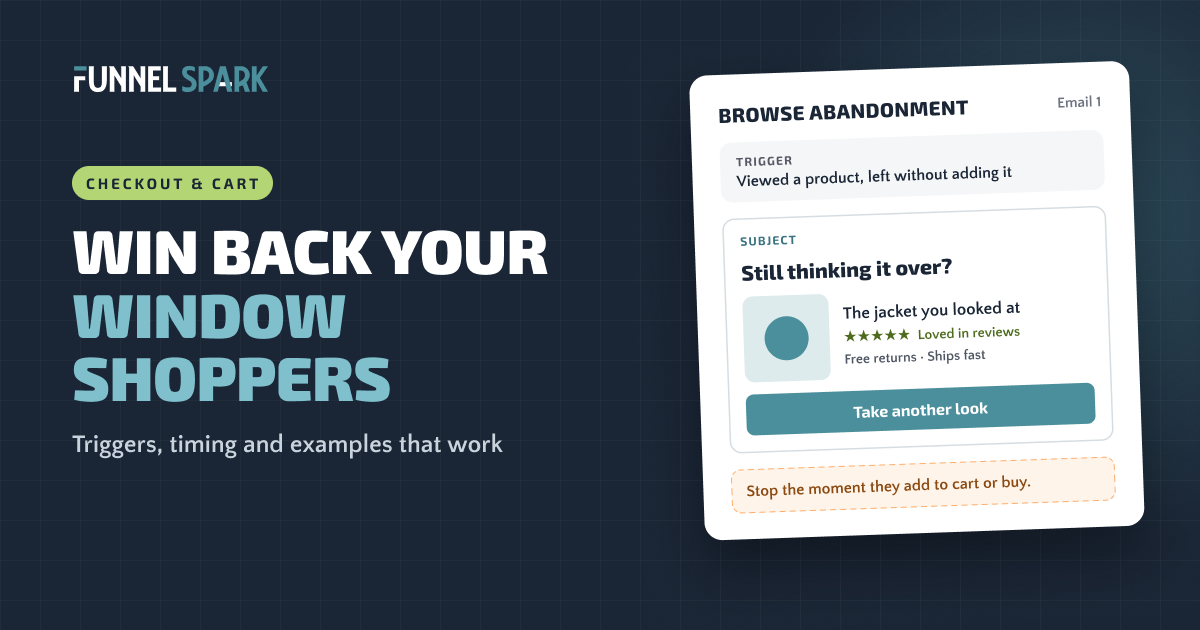
A browse abandonment email goes to a known shopper who looked at a product and left without adding it to the cart. Send the first one a few hours later with the product, its reviews and one button back. Follow up about a day later with answers or alternatives. Stop the moment they add to cart or buy.
What is a browse abandonment email?
A browse abandonment email is an automatic email sent to someone who viewed a product on your store and left without adding it to their cart. Think of a shopper who picks up a jacket in your shop, looks at the tag, and puts it back. You wouldn't chase them out the door. But if they're on your mailing list, a friendly "still thinking about it?" a few hours later is fair game.
It's the step before cart abandonment. The shopper showed interest, but less of it. That changes what you send:
Browse abandonment vs cart abandonment
| Browse abandonment | Cart abandonment | |
|---|---|---|
| What the shopper did | Viewed a product, no cart | Added to cart, didn't buy |
| How ready to buy | Curious, still deciding | Close to buying |
| Tone | Helpful, low pressure | Reminder, then urgency |
| Discount? | Almost never | Only in the last email, if at all |
| Who gets it | Shoppers already on your list or known to your email tool | Usually anyone who typed an email at checkout |
If you haven't set up your cart emails yet, do those first: they reach shoppers who were closer to buying. Here are our abandoned cart email examples and the 3-email sequence we'd start with.
Do browse abandonment emails work?
Yes, though less than cart emails. Klaviyo published these numbers:
of browse abandonment emails lead to an order, about 9.6 times the 0.10% of a regular email campaign. Abandoned cart emails convert at 3.55%. Source: Klaviyo's blog post on browse abandonment email examples, based on Klaviyo data.
And there's a lot of window shopping. In Baymard Institute's survey, 42% of US online shoppers said they had abandoned a cart because they were "just browsing" or not ready to buy. Many will buy later, from you or from the store that reminded them.
What triggers a browse abandonment email?
A product view by someone your email tool can identify, with no add to cart after it. Each platform does it a little differently:
- Klaviyo: Klaviyo's help center says the flow is triggered by the Viewed Product metric, so you need Klaviyo's onsite tracking turned on (on Shopify, that's the Klaviyo app embed). It only tracks browsers that have been identified or "cookied", for example by submitting one of your forms. It recommends skipping anyone who ordered or started checkout since the flow began, or went through it in the last 30 days, and waiting at least 1 hour before the first email.
- Shopify: Shopify Messaging has a template called "Convert abandoned product browse." Shopify's help center says it sends a marketing message to customers who view at least one product and leave without adding it to the cart or buying. By default, Shopify's marketing automations only go to customers subscribed to marketing. The matching Shopify Flow template skips anyone who got an abandoned checkout, cart or product browse email in the last 14 days.
- Omnisend: Omnisend's help center describes "Browse Abandonment" as firing on page views like collections, with product pages handled by a separate Product Abandonment workflow. It only reaches identified contacts.
Whatever the tool, the logic is the same. Each shopper should get one email series for the furthest step they reached:
Which recovery email does a shopper get?
Browse abandonment email, a few hours later. Helpful, no pressure.
Abandoned cart email instead. The browse series stops.
Abandoned checkout email instead. Earlier series stop.
No recovery email. Every series stops. Send the order confirmation.
Set a frequency cap so the same person doesn't get a browse email every time they look around. Klaviyo suggests 30 days; Shopify's Flow template uses 14.
You can only email shoppers you know
This is the part most guides skip. A browse flow can't email an anonymous visitor, and most product page traffic is anonymous. So the size of this flow depends on how many visitors you've already turned into subscribers.
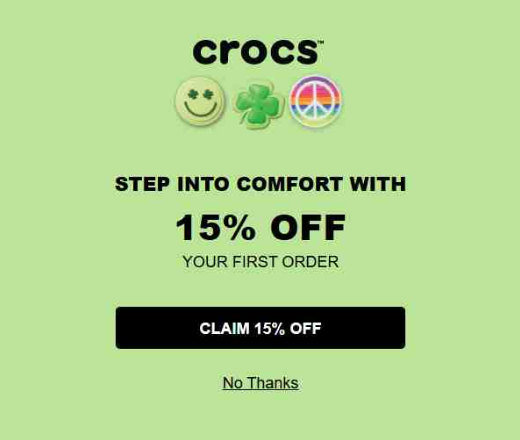
That makes your sign-up forms part of your browse abandonment setup. Crocs greets visitors with an entry pop-up built around one clear offer:
Steve Madden puts the benefit right in the headline of its footer sign-up, with a consent checkbox under the email field:
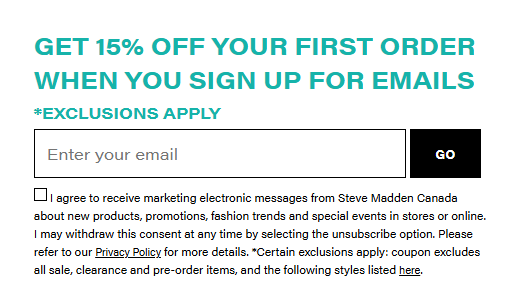
Two lessons. Give people a reason to sign up: a first-order offer, early access, a buying guide. And collect clear marketing consent, because browse emails are marketing emails. Every new subscriber is one more window shopper you can follow up with.
When to send them: a simple 2-email sequence
Klaviyo's blog suggests at least 3 emails and 1 text message. We'd start smaller: these shoppers showed less intent than cart abandoners, so 2 emails are plenty. Add a third once the second proves it makes money.
A browse abandonment sequence to start with
| When | Its job | |
|---|---|---|
| 1. "Still thinking it over?" | 2 to 4 hours after the visit (at least 1 hour) | Show the product they viewed: photo, price, star rating, 1 button back to that page |
| 2. "Here's what people ask" | About 24 hours later | Answer the common questions (shipping, returns, fit) and show 2 or 3 similar products or best sellers |
| Stop | Any time | The shopper adds to cart, starts checkout or buys |
Our starting point, not a rule. Test the timing and the number of emails once the flow is running.
Why not send it right away? An email 5 minutes after someone leaves feels like being watched. A few hours later, it feels like a helpful nudge.
Go easy on recent customers, too. Klaviyo's blog suggests holding off for a month or two after someone's first order.
Browse abandonment email examples, described
Here are 5 types that fit most stores. Pick the one that matches your products and your voice.
- The plain reminder. A big photo of the product they viewed, the name, the price and one button: "Take another look." No clever copy needed.
- The reviews email. The product plus 2 or 3 short customer reviews, ideally ones that mention fit, quality or delivery. Reviews answer "is it any good?" better than anything you write.
- The question answerer. Lead with the worries that stop people: what shipping costs and how long it takes, how returns work, how to pick a size. One line each, with a link for more.
- The "you might also like" email. Maybe the product wasn't quite right. Show it next to 2 or 3 close alternatives or your best sellers in that category.
- The honest scarcity email. Only if it's true: low stock, or a sale that ends soon. Never invent a deadline. Shoppers notice.
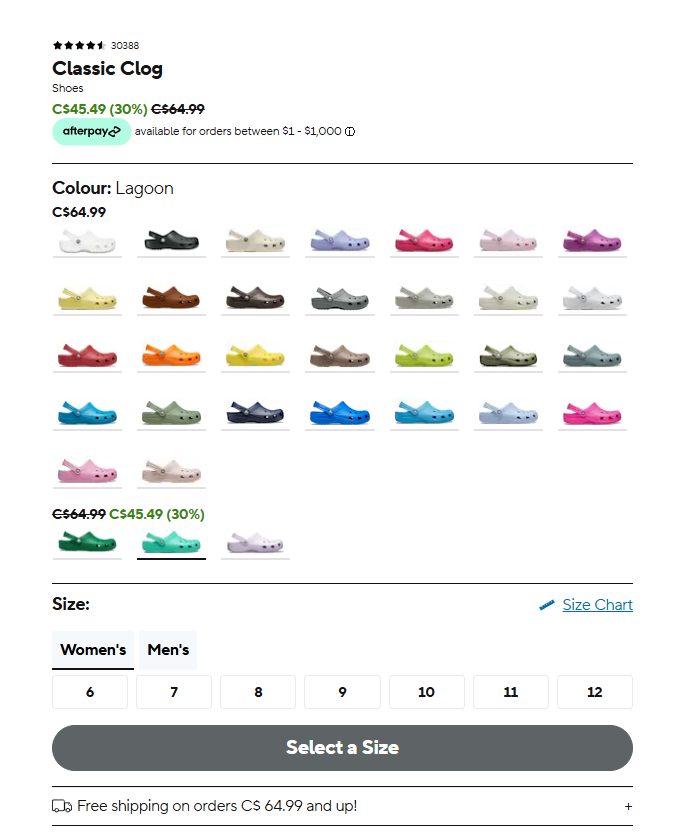
You don't have to write most of this from scratch. Your product page already has it. Here's the Crocs buy box: star rating, sale price, a pay later option, colors and a free shipping line. That's a ready-made browse email.
Browse abandonment subject lines
Keep them short, friendly and about the product. Swap in your own product names:
- Still thinking about the [product]?
- Take another look at [product]
- Here's what customers say about [product]
- Questions about [product]? We've got answers
- A few picks like the one you viewed
Should you add a discount?
Usually not. A shopper who looked once hasn't told you price is the problem, and if every browse earns a coupon, people learn to look, leave and wait. Klaviyo's blog also warns that discount symbols in subject lines can hurt deliverability. If you want to test an offer, try it in the second email only, and judge it on profit, not orders. Here's how BOGO, gift with purchase and discounts compare on profit.
Fix the product page first
A browse email sends people back to the same page that didn't convince them the first time. If it doesn't answer their questions, the second visit ends the same way.
A browse email can't fix a product page that doesn't answer the shopper's questions. If lots of people look and few add to cart, fix the page first. Then the email has something worth coming back to.
Look at what big stores show shoppers before checkout. Of the 25 top stores we broke down page by page, 23 show ratings and reviews on the product page, 12 make a guarantee or returns promise, and 9 show shipping or delivery details on the product or collection page. Those are the same answers your browse email should repeat.
If your add to cart rate is low, start with our guide to the add to cart button and what sits around it, then work through our product page optimization guide. And once shoppers do add to cart, our guide to reducing cart abandonment covers the next leak.
How to know it's working
Opens and clicks don't tell you an email made money. Watch these instead:
- Placed order rate: the share of people who got the flow and then ordered.
- Revenue per recipient: revenue from the flow divided by the people who got it. It's the email version of revenue per visitor, and it lets you compare 2 versions fairly.
- Unsubscribes: if they jump, you're sending too often or too soon.
The honest test is a holdout: hold back a small random group from the flow and compare how much each group buys over the next 2 weeks. Some people would have come back anyway, and a holdout shows how many. Our guide to ecommerce A/B testing explains how to read the result.
For the bigger picture, here's how to increase your Shopify conversion rate, in the order we check a store.
FAQ
It's an automatic email sent to a known shopper who viewed a product on your store and left without adding it to their cart. It shows them the product again, answers common questions and links back to the product page.
A few hours after the visit is a good start. Klaviyo recommends a delay of at least 1 hour. We'd send the first email 2 to 4 hours later and a follow-up about 24 hours after that, then test the timing.
Start with 2: a reminder with the product and its reviews, then a follow-up that answers questions or shows alternatives. Add a third only if the second one makes money. Stop the series as soon as the shopper adds to cart or buys.
Yes. Shopify Messaging has a "Convert abandoned product browse" template that emails customers who view a product and leave without adding it to the cart or buying. By default, Shopify's marketing automations only go to customers subscribed to marketing.
Browse abandonment means a shopper viewed a product but didn't add it to the cart. Cart abandonment means they added it but didn't buy. Cart abandoners are closer to buying, so their emails can be more direct. Browse emails should stay helpful and low pressure.
Written by
Nicolas Fradet
Nicolas is the founder of FunnelSpark, an ecommerce CRO agency. He has spent 16 years finding out why shoppers don't buy, with 1,000+ A/B tests run and a 37% win rate. He wrote Stop Guessing. Start Converting.
Follow Nicolas on LinkedIn →Want us to find what's stopping your shoppers?
On a free 30-minute call, Nicolas looks at your store and shows you 3 growth opportunities, whether we work together or not.
Book your free call