How to get more product reviews on Shopify (and put them where they sell)
Your reviews app is already installed. Here's how to get more reviews, fresher ones and more photos, and where to show them so they lift revenue per visitor.

By Nicolas Fradet, founder of FunnelSpark · 16 years in CRO, 1,000+ A/B tests
Updated Nov 23, 2026 · 9 min read
The short answer
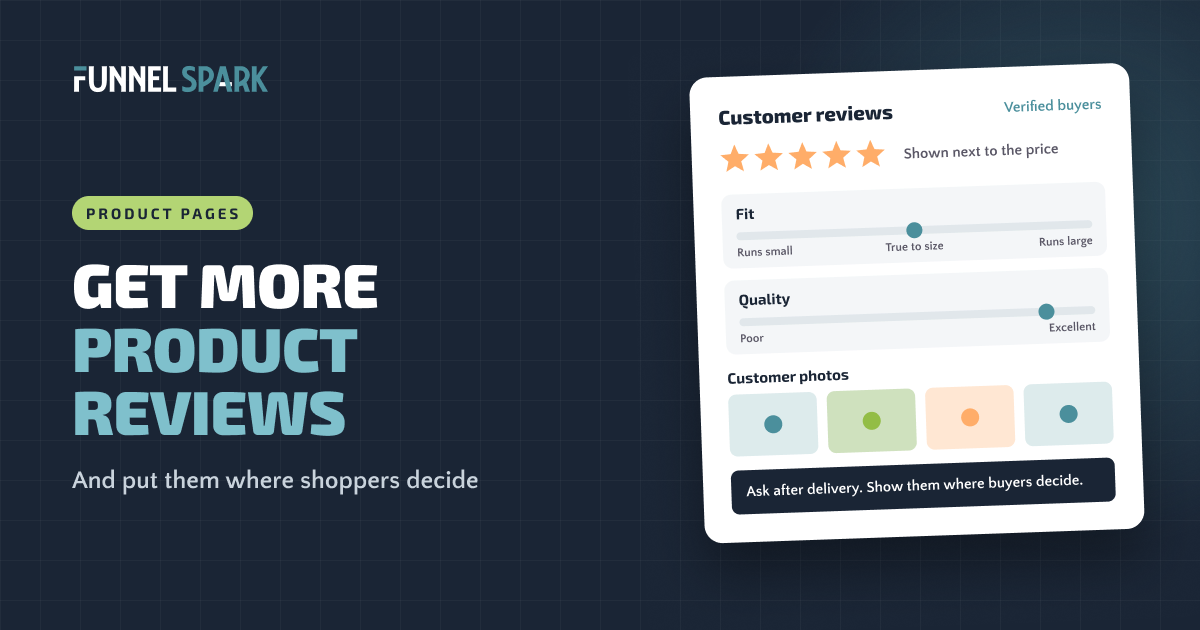
Ask every buyer a few days after delivery, not after purchase, with a 1-tap rating, 1 specific question and a request for a photo. Send 1 reminder. Point requests at products with fewer than 5 reviews. Then show stars and count next to the price, a fit or quality summary near the picker, and a short review in the cart.
Why reviews still move sales when every store has them
Product reviews are what past buyers say about a product: a star rating, a short text and, more and more, a photo. At $100k+ a year you already collect them. The real questions are whether you have enough on the right products, whether they're recent, and whether shoppers see them when they decide.
top stores we broke down page by page show ratings and reviews on the product page. Only 2 don't. Having reviews doesn't set you apart. How many you have, how fresh they are and where you show them does. Source: FunnelSpark's breakdown of 25 top online stores.
The best public research here is from the Spiegel Research Center at Northwestern University. A product with 5 reviews was 270% more likely to be bought than one with none, and the benefit of extra reviews dropped quickly after the first 5. The lift was bigger for pricier products (380%, against 190% for a cheaper one), and purchase likelihood usually peaked at ratings between 4.0 and 4.7, not at a perfect 5.0.
So the plan is simple: get every product with real traffic past 5 reviews, pricier ones first, keep your best sellers fresh, and don't chase a perfect score. More on the trust side in our guide to building trust when nobody knows your brand.
How many reviews does a product need?
At least 5 on every product that gets traffic, plus a steady flow of new ones on your best sellers. Take a store doing $1.5M a year: 60,000 sessions a month, 2% conversion, $105 average order, so 1,200 orders a month. Here's what it collects at different review rates (reviews written divided by requests sent):
Example: a $1.5M store with 1,200 orders a month
| Review rate | Reviews a month | Per best seller a month | Months for a slow seller to reach 5 |
|---|---|---|---|
| 3% | 36 | about 1 | about 62 |
| 6% | 72 | about 2 | about 31 |
| 10% | 120 | about 3.6 | about 19 |
Our example. Assumes 1 request per order, 20 best sellers that get 60% of orders, and 180 other products that share the other 40%.
Best sellers are fine at almost any rate. The problem is the long tail: at a 3% review rate, a product that sells a few times a month takes about 5 years to reach 5 reviews, and those are often the products you're launching or advertising. So set 3 goals:
- Every product with real traffic has 5+ reviews. Request a review for every item in an order, and group reviews for colors of the same product that are set up as separate products.
- Your top 20 products get new reviews every month. A best seller whose newest review is 8 months old looks like it stopped selling.
- A growing share of reviews include a photo. More on that below.
When should you send a review request?
After delivery, not after purchase. When a package takes 9 days, a request sent "7 days after the order" asks someone to review a product they haven't opened. They ignore it, or leave 1 star about shipping.
Judge.me's help center, for example, explains that its requests can wait until Shopify marks the order delivered, then go out after the delay you set. USPS, UPS, FedEx and Canada Post update that status directly; other carriers need a tracking app, or the request never sends. If your app can only trigger on fulfillment, add your usual transit time to the delay.
How long to wait after delivery
| Product type | Wait | Why |
|---|---|---|
| Apparel and shoes | 5 to 7 days | They've tried it on and decided to keep it. |
| Beauty and skincare | 2 to 3 weeks | Results take time to show. |
| Supplements and food | 3 to 4 weeks | Time to notice a difference, and before the reorder. |
| Home and furniture | 1 to 2 weeks | Unboxed, assembled and used. |
| Tech and accessories | 5 to 10 days | Set up and used a few times. |
| Gifts | After the occasion | The buyer hasn't seen it used yet. |
Our starting points. Test 2 delays against each other and compare review rates.
A review request flow that gets more (and better) reviews
What to put in a review request email
This email is where the review rate is won or lost. The changes we'd make first:
- Name the product and show it. "How are your new trail boots?" beats "We'd love your feedback."
- Make the first step 1 tap. If your app supports it, let people tap a star right in the email and land on a form that's already started.
- Ask 1 specific question. Did it fit? How's the scent? Specific questions get reviews that answer the next shopper's worry.
- Ask for a photo, and say why: "Other customers want to see it on a real person."
- Send 1 request per product. In a 3-item order, the slow seller is the one that needs the review most.
- Send 1 reminder about 5 to 7 days later to anyone who hasn't reviewed, then stop.
- Send it to every buyer, not only the ones you think are happy (see the next section).
Can you offer an incentive for reviews?
Yes, with conditions. The FTC's guide for marketers, Soliciting and Paying for Online Reviews, says an incentive can't depend, openly or by hint, on the review being positive, and the review should disclose the incentive. The FTC's Q&A on its Consumer Reviews and Testimonials Rule gives an example: a coupon offered with "Tell us how much you loved your visit" implies the review must be positive. The rule lets courts impose civil penalties for knowing violations.
Review incentives and the FTC: what's usually fine
| Usually fine | Not fine |
|---|---|
| Points or a discount for any honest review, with the incentive disclosed on the review | A reward only for 4- or 5-star reviews |
| Asking every buyer for a review | Asking only customers you expect to be happy |
| Sorting reviews by most helpful | Hiding or burying negative reviews in your reviews section |
| Leaving out reviews about another product, if you treat good and bad ones the same | Staff or family reviews that don't disclose the connection |
| Asking a satisfied customer to update an old review | "Tell us how much you loved it" next to the reward |
Based on the FTC's guide for marketers and its Q&A on the Consumer Reviews and Testimonials Rule. Not legal advice.
On asking only happy customers, the Q&A says the rule doesn't ban it outright but it could still break the FTC Act, and the guide says not to do it. Some review platforms ban incentivized reviews even with a disclosure, so check theirs too, and have a lawyer look at any large incentive program.
A clean way to use incentives: reward the photo, not the opinion. "Add a photo to any review and get 200 points" pays the same for 2 stars as for 5.
Photo reviews and sub-ratings
Stars say people liked it. A photo shows what it really looks like, and a sub-rating answers the specific worry. In a PowerReviews survey of 15,870 US shoppers, 60% said they always look for customer photos or videos before buying, and 23% said they won't buy a product that has none. That's what people say rather than what they do, so treat it as a reason to test photo reviews, not proof they'll win.
Oh Polly does this well. Every review rates the overall fit, from "runs small" to "runs large", plus quality and design, so a shopper can check the sizing before picking a size:
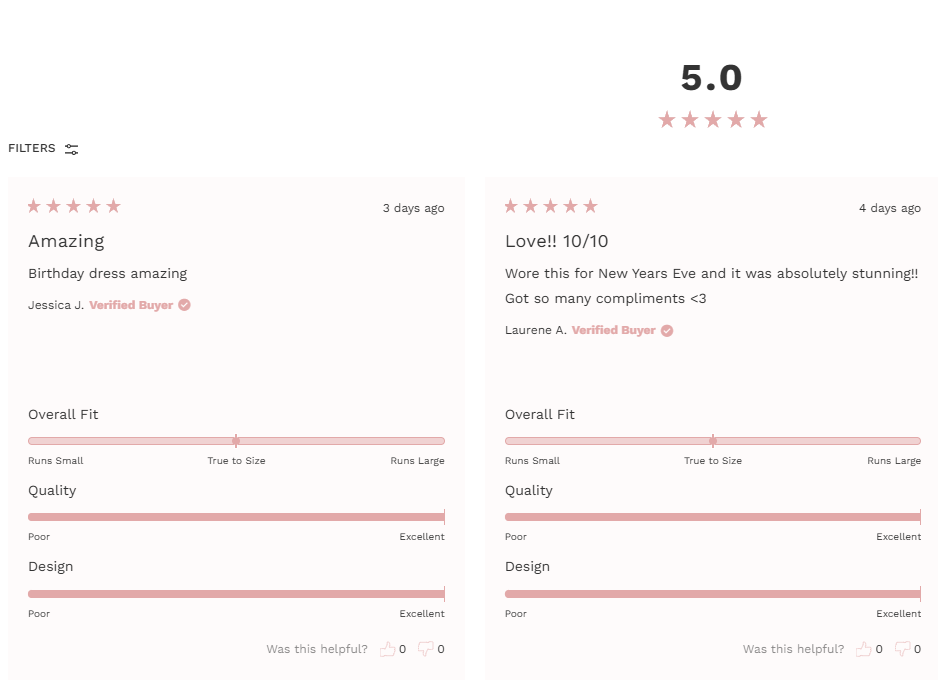
Pick your sub-ratings from your returns and support data: the top reasons people send things back or email you before buying. Fit and length for apparel, skin type and scent for skincare, assembly and comfort for furniture. Keep it to 2 or 3, or fewer people finish the form.
Customer photos work the same way. Gymshark, Crocs and Blueland all pair their reviews with user-generated content on the product page. Make the photo upload easy on a phone, since many buyers will open your request email there.
Where to put reviews so they sell
The full reviews section usually sits at the bottom of the product page, under the description and the tabs. Many shoppers decide before they get there, especially on a phone. So bring the proof up to where the decision happens:
Where to show reviews
| Spot | What to show | Plan |
|---|---|---|
| Under the title, next to the price | Stars, average and review count, linked to the reviews | Any |
| Next to the size or variant picker | Your fit or key sub-rating summary | Any |
| In the image gallery | 1 or 2 customer photos | Any |
| Under the add to cart button | 1 short review that answers the main worry | Any |
| Collection page cards | Stars and review count | Any |
| Cart or cart drawer | The item's rating or 1 short review | Any |
| Checkout, near the pay button | A short review line | Plus |
Text or reviews inside Shopify's checkout steps need Shopify Plus. On other plans, keep the proof in the cart.
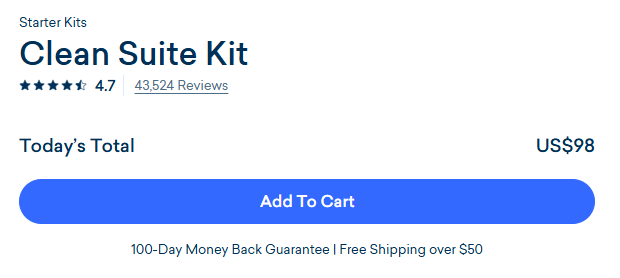
The top stores start the proof early. Fenty Beauty puts its stars and reviews high on the product page, and 14 of the 25 top stores we broke down show star ratings on their collection pages, so shoppers see proof before they even click a product. Blueland is one of 8 of the 25 that lean on a massive review count, and it shows it right in the buy box:
Inside the reviews section, sort by "most helpful" or "with photos" by default, add filters by rating and sub-rating, show the date on every review, and keep the negative ones visible.
For your developer: most reviews apps fill Shopify's standard rating metafields (Judge.me's help center lists reviews.rating and reviews.rating_count), so the theme can show stars and counts in the buy box, on cards or in the cart drawer without loading the full widget there. If you're on Plus and want a review near the pay button, our guide to Shopify checkout extensibility shows what you can add. For the rest of the page, see our product page optimization guide, and for why a review beats most badges, do trust badges work?
Review syndication: reuse reviews across stores and retailers
Review syndication means showing the same reviews in more than one place. Three cases matter at your size:
- Several Shopify stores. If you run country or wholesale stores, share one review pool per product so a new store doesn't launch at zero. Check that your app supports it.
- Retailers. Okendo, for example, can send your reviews to the Bazaarvoice network, which its help center says reaches 2,300+ retailer sites. It takes your own Bazaarvoice contract, a higher Okendo plan, and a UPC, GTIN or EAN in each product's barcode field.
- Shop. Shopify's help center says reviews collected with supported partner apps can be shown on Shop, Shopify's shopping app.
How to test and measure it
Measure the review program and the money it makes. For the program, check 4 numbers once a month:
- Review rate: reviews collected divided by requests sent.
- Coverage: the share of products with traffic that have 5 or more reviews.
- Photo share: the share of new reviews that include a photo.
- Freshness: the age of the newest review on each of your top 20 products.
For the money, A/B test placement changes and judge them by revenue per visitor, not conversion rate alone. Our example store makes $2.10 per visitor ($126,000 a month divided by 60,000 sessions). Every 1% relative lift in conversion is worth about $15,000 a year, and 3% about $45,000.
The catch: say 45,000 of those sessions reach a product page. At 2% conversion, proving a 20% lift takes about 21,000 visitors per version (about 4 weeks), and a 15% lift about 37,000 per version (about 7 weeks). Our A/B testing guide has the full table. Moving the stars up a few lines is too small to prove at this size, so test a bundle: stars and count next to the price, a fit summary by the size picker and 1 customer photo in the gallery. Watch add-to-cart rate early, but call the test on revenue per visitor.
Then queue these:
- A short review or the item's rating in the cart drawer.
- Customer photos in the main image gallery instead of only in the reviews section.
- Stars and review count on collection page cards.
- Request timing: 7 against 14 days after delivery, judged on review rate and the share of reviews with a photo.
At FunnelSpark, an ecommerce CRO agency for Shopify stores, we've run more than 1,000 A/B tests, and the pattern holds: your reviews app collects the proof, but where you show it decides whether it sells. If your store does $100k or more a year, or you run ecommerce in-house, book a free 30-minute call and we'll show you where proof would move the most revenue on your store.
FAQ
Ask every buyer a few days after delivery, not after purchase, with an email that names the product, allows a 1-tap rating, asks 1 specific question and asks for a photo. Send 1 reminder, request a review for every item in the order, and focus on products with fewer than 5 reviews.
After delivery, with a delay that fits the product: about 5 to 7 days for apparel and shoes, 2 to 3 weeks for skincare, 3 to 4 weeks for supplements. A fixed delay after purchase reaches some people before their package does.
Yes, if the reward doesn't depend on the review being positive and the review discloses the incentive, per the FTC's guide for marketers. A reward only for 5-star reviews crosses the line. Some review platforms ban incentives entirely.
Install a reviews app from the Shopify App Store, add its blocks in the theme editor (a star rating under the product title, the full reviews section lower down) and turn on its review request emails. Most apps also fill Shopify's rating metafields, so your theme can show stars on product cards and in the cart.
At least 5. The Spiegel Research Center at Northwestern University found that a product with 5 reviews was 270% more likely to be bought than one with none, and that the benefit of extra reviews dropped quickly after the first 5. After that, focus on keeping reviews recent on your best sellers.
Written by
Nicolas Fradet
Nicolas is the founder of FunnelSpark, an ecommerce CRO agency. He has spent 16 years finding out why shoppers don't buy, with 1,000+ A/B tests run and a 37% win rate. He wrote Stop Guessing. Start Converting.
Follow Nicolas on LinkedIn →Want us to find what's stopping your shoppers?
On a free 30-minute call, Nicolas looks at your store and shows you 3 growth opportunities, whether we work together or not.
Book your free call